
Oh yes! This is the default setting in Vista Windows 10 and 8.1 / 7. Some one like the desktop icons from Windows XP or Windows 2000.This can be very easy changed: click with the right mouse button on a free desktop place. Then appears the pop-up menu, simply click View then click Classic Icons (symbols ). That's all. (... see Image-1 Point 1 and ) See also: ► Is desktop icons hiding not a joke program, who needs that?Note!
Most of the windows desktop symbols you add to your desktop will be shortcuts, but if you need it, you can also save files or folders and delete at any time on the new windows desktop. For example, if you delete files or folders that are stored on your new desktop, they are moved to the Recycle Bin, but you can delete them forever and if you delete a simple desktop shortcut, the shortcut is removed from your desktop, but the original file, program, APP or location that the shortcut links to is not deleted. See also: ► Where is the real Desktop folder path in Windows 8.1 / 8 / 10?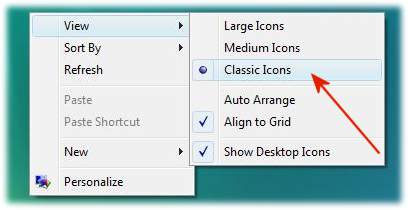
Info:
Your Windows desktop background doesn't have to be a simple single picture or image anymore. With Windows Vista, 7, 8.1, 10 , you can display a slide show of images, instead. Some Windows nice themes include a slide show, or you can create your own slide show from your personal collection of pictures. For more information about setting up a slide show background, .... see Create a desktop background slide show. FAQ 5: Updated on: 29 September 2018 19:10 |
| |||||||||||||||||||||||||||||||||||||||||||||||||||||||||||||||||||
