... News || Home || Impressum || Contact || Guestbook


HOME » Faq » FAQ - file management freeware Q-Dir


««« Answer 48 of 75 »»»

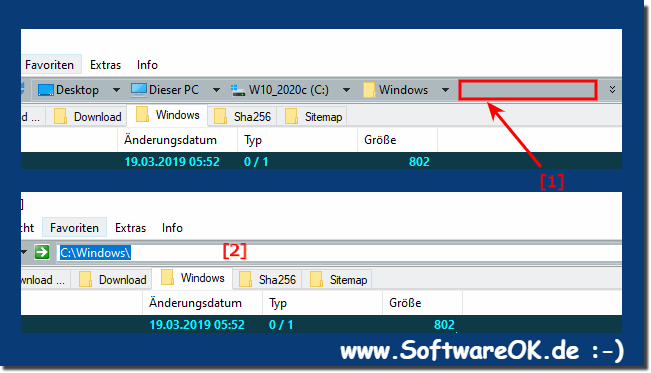
How can edit or copy very long paths in Vista address bar?


For short paths:
Click in the address bar in the free area right next to the small black PopDown triangle,
so that the full directory name as the selected text appears.


For long paths:

The key combination [Alt+ S]
edit folder path

Q-Dir is suitable for Microsoft Windwos :
Servers 2000 / 2003 / 2005 / 2008 Win 98 / XP / Vista and Windows Seven x64 and x86
FAQ: file management freeware Q-Dir
43. Is it possible to change the title of the Q-Dir window?
44. I think is missing is the "Invert Selection" option!
45. How can I change the colour of the header bar of the active window?
46. How can I Portable files are opened using programs from that same location?
47. How to change the background colour of the active pane?
48. How can edit or copy very long paths in Vista address bar? ***
49. How can I force move or copy of the data while dragging?
50. Occasional problems with "*.qdr" files. The icon is now red not blue!
51. How do I use the Q-Dir internal file association rules eg 7-Zip?
52. Q-Dir and Windows x64. How does it work?
53. How to navigate up a folder?

»»

  Q-DIR FAQ-INDEX

»»

  My question is not there in the FAQ
  
Go to FAQ:
Q-DIR | DesktopOK | SoftwareOK | Win-7 | System-General |


Quick-Link'sPrint directoryTablets for your CMD.exeThumbnails PrintBIN to ISODearest-KO's
HomeThanksContactLink meFAQ InBox / InBox_grEnglish-AVImpressumTranslatePayPal
  •  © 2010 by Nenad Hrg // softwareok.desoftwareok.comsoftwareok.eu •  
SGT : 0.78 sek.


Easy File Management with Q-Dir   Favorit Desktop Icon Layout   Vista address bar   Microsoft Store   How to browse FTP directory   Stress your LCD   windows7 FAQ   Dead pixel policy   Visual impairments?   Stretch the Screen   Remembered Fonts