
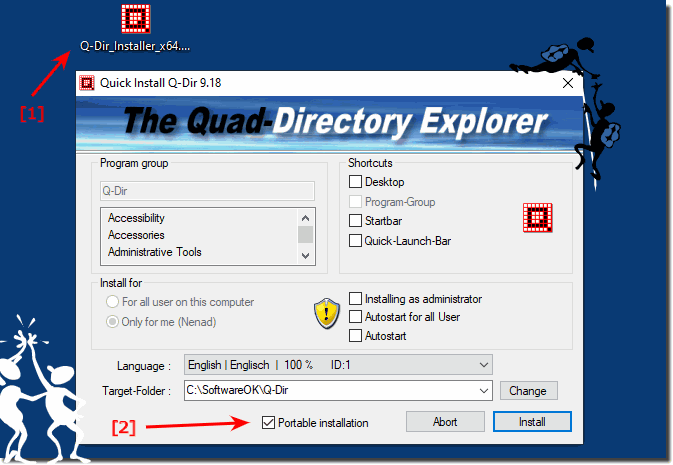
To install Q-Dir for Portable usage is very easy whit the Quick Install feature in Q-Dir for MS Windows Desktop 11, 10, ... and Server OS!This is for the ► Quad Explorer Q-Dir and also for ► Meinplatz! Content: 1.) ... Q-Dir Portable Install!
|
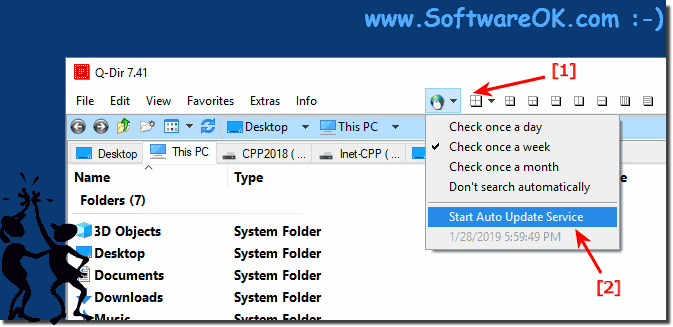
| (Image-3) Q-Dir Explorer Auto-update and Version Checker! |
 |

4.) Why a portable installation of Quad File Explorer?
A portable installation is often used to install software on a computer without embedding itself deeply into the operating system. This allows the software to be easily transported and used on different computers without having to reinstall it on each individual system. Some reasons for using a portable installation are:
Mobility: The software can be installed on a USB stick or external hard drive and from there run on different computers. This is useful if you want to use your favorite programs on multiple computers without reinstalling them each time.
Isolation: A portable installation isolates the software from other programs and the host computer's operating system. This reduces potential conflicts with other installed applications and prevents possible impact on the system.
Security: Because a portable installation contains the software in a separate folder or file structure, potential security risks can be limited. The software may interact less with the operating system and therefore have less access to important system components.
Data Protection: Using a portable installation allows you to carry the software on an external drive and carry personal data or settings with you without leaving them on the host computer. This is useful if you work on a public computer or want to protect your privacy.
Testing: Developers often use portable installations to test software on different systems without affecting the main installation. This allows them to ensure that their software works properly on different environments.
Overall, a portable installation provides flexibility and convenience for users who want to use their software across different computers without experiencing the complexity of a traditional installation on each system.
5.) What is the use of auto-update in File Explorer?
The "autoupdate" in software refers to the automatic updating of applications on a computer. This feature provides several benefits:Security Updates: Auto-updates ensure that software is provided with the latest security patches and updates. This is especially important to close security gaps and protect computers from potential threats.
Performance improvements: Software manufacturers regularly release updates to fix bugs, improve performance, and add new features. Auto-updates ensure that users have access to these improvements without having to manually check for updates.
Ease of Use: Auto-updates make the update process convenient and seamless for users as they do not have to actively check for updates or install them manually. The software is automatically updated in the background, saving time and minimizing effort.
Reducing compatibility issues: Regularly updating the software can resolve compatibility issues with other programs or the operating system. This helps to improve the stability of the system and avoid possible conflicts.
Latest features: Auto-updates ensure users have access to the latest features and improvements to the software without having to manually check for updates or download new versions.
Overall, software auto-update helps improve the security, performance, usability, and functionality of applications on a computer by automatically providing the latest updates.
6.) What is the automatic update of the file explorer views good for?
The "autoupdate" in File Explorer usually refers to the automatic updating of the file and folder view when changes are made to the file system. This feature offers several benefits:Real-time updating: Auto-update instantly updates the file and folder view in File Explorer when changes are made to the file system. This allows users to see the current state of the file system without manual updating.
Efficiency: Instead of having to manually update the view, Autoupdate does this task automatically. This saves time and minimizes effort for the user.
Ease of Use: Auto-update improves the usability of File Explorer by allowing users to rely on the view to always be up to date. This reduces possible confusion about the current status of files and folders.
Speed up workflows: Especially for users who frequently work with files and folders, Auto-update in File Explorer can speed up workflow by allowing them to see changes immediately without having to manually refresh the view.
Consistency: Autoupdate contributes to the consistency of the user experience by ensuring that the file and folder view always reflects the current state of the file system.
Overall, Autoupdate in File Explorer is a useful feature that helps improve the efficiency and usability of navigating and managing files and folders.
FAQ 23: Updated on: 22 February 2024 20:38
