
Is it easy to change the background color of the active explorer pane in the Quad Directory File Manager !New from version 7.21 Save the color setting in the Favorites on Windows 11, 10, etc.! Content / Solutions / Tips: 1.) ... Change the background color in Q-Dir!
|
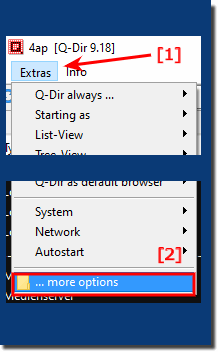
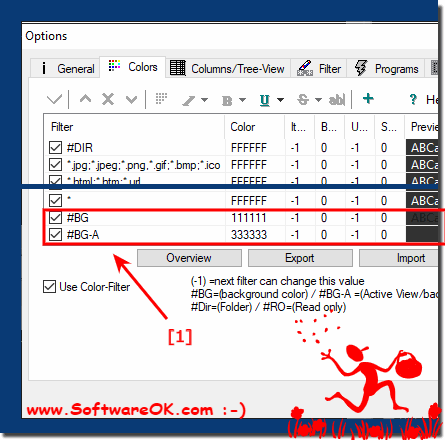
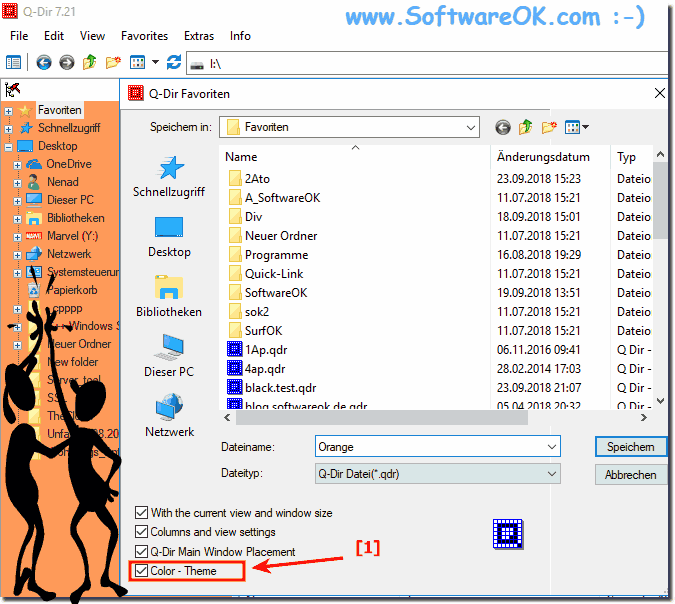
| (Image-1) Save background colour of explorer in Favorite.qdr! |
 |

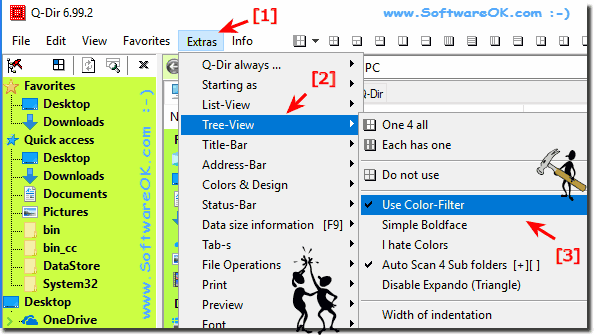
3.) it is not possible to colorize the background of Tree View?
MENU ► Extras ► Tree-View ► Use Color-Filter (... see Image-3)
| (Image-3) Q-Dir not possible to colorize the background of Tree View! |
 |
Info:
Changing the background color of the active Explorer window is an elegant solution not only written for Windows 10, this screenshot has already been made under Windows 10, as you can see in Windows 10 shot screenshot above. However, you can easily use this example to change the background color of the active Explorer window as a solution even on earlier versions of Microsoft's Windows operating systems. The nice thing is that it's the background color of the active Explorer window, whether it's a native Windows desktop machine, on the go on the tablet, Surface Pro / Go, or even a business server operating system in the office. It was tested on various MS OS and successfully verified.
Changing the background color of the active Explorer window is an elegant solution not only written for Windows 10, this screenshot has already been made under Windows 10, as you can see in Windows 10 shot screenshot above. However, you can easily use this example to change the background color of the active Explorer window as a solution even on earlier versions of Microsoft's Windows operating systems. The nice thing is that it's the background color of the active Explorer window, whether it's a native Windows desktop machine, on the go on the tablet, Surface Pro / Go, or even a business server operating system in the office. It was tested on various MS OS and successfully verified.
4.) More tips on color etc.!
You see the background color of the active explorer in Windows is independent of your Windows version and the theme you use. In the newer versions of Windows 10 and Windows 11, you can adjust the background color of the active explorer in the settings without changing the entire operating system.
Another option:
►► Color filters for files and folders in the explorer views e.g. MP3, but how?
►► Set your own theme in Q-Dir for Windows!
►► Background color and selection in the explorer and tree structure!
►► Remember marked folders and files during navigation?
FAQ 47: Updated on: 25 September 2023 06:13
