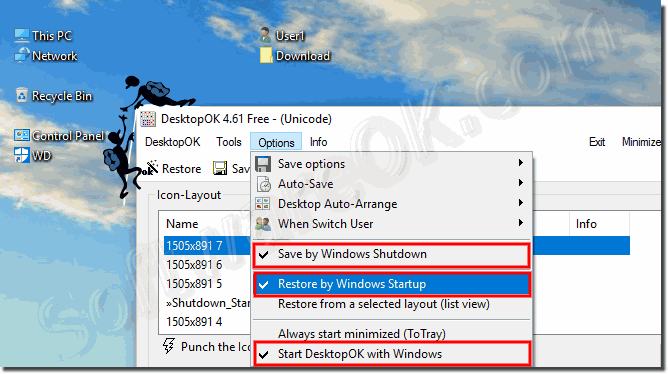
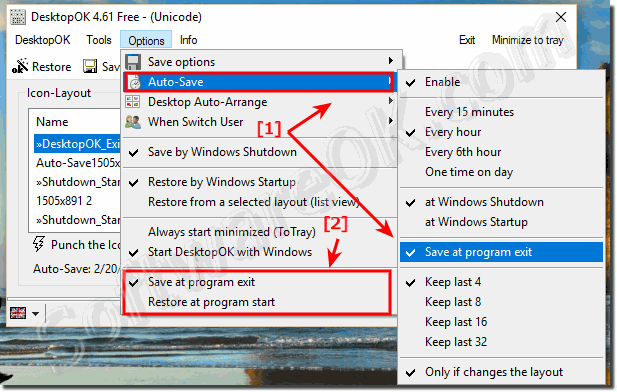
It is easy to start the Freeware Desktop Icon Restore for Windows minimized and /or always minimized To-Tray in Windows Desktop-Tray Bar. Info: DesktopOK
Yes, DesktopOK has this save option for the correct layout naming for multi-screens and virtual desktop, via menu, menu-point Save Options. Info: At 1.75
At DesktopOK 1.71 it is possible to save the DesktopOK settings and Desktop Icons Layout in The Windows Registry Similarly, one can now optionally rename
It is very easy to switch / change the Language in DesktopOK to English or to Other Language for Windows 11, 10, etc.. Is the same version or download. Please
How do save layout between icons on the desktop in windows 10 for next Login or user switch?
Windows 10 change the layout of the desktop icons when logging in?
Solutions to restore the desktop icons or symbols at windows 10 start!?
Before and with the other notebooks (all less powerful than my notebook), the desktop appears from the beginning with correctly arranged icons. Even more: The "Restore at system start" option in DesktopOK is not active on all devices. This is probably because I keep distributing an empty basic settings ini in which this option was not activated. In other words: Something happened to my notebook after installing this CCleaner Pro. As soon as I reinstall CCleaner Pro, my PC behaves again with and without the "Restore at system startup" option activated, so that after each start the icons appear as they were last arranged.?
You don't have to pursue this any further. As soon as the distribution of the new Windows version officially starts in April or May, I will get this version immediately and install it "clean" on my notebook. After that, the notebook and I will at least never have to do with the CCleaner Pro again. But there will be other surprises - that's for sure with PCs and software.?
Desktop change icons layout on windows 10?
Windows 10 change desktop icons?
Solutions to restore desktop icons or icons in Windows 10 at startup?
Can I restore the desktop icons on Windows 10?
How to save icon spacing and position on Windows 10 or 8.1?
I have desktop ok on my (now windows 10) computer. It simply doesn't work & so frustrating when computer RESTARTS (usually after windows updates) it simply doesn't restore...?
How can I save icon spacing and position in Windows 10 or 8.1?
How restore desktop icons at windows 10 start?
Change desktop icons layout on the windows 10 desktop?
How to change the icon layout on Windows 10 desktop?
I work with two 27-inch screens, and I put icons on both desktops. Both desktop settings are automatically saved correctly and after I have clicked on Restore are also displayed in the version I last changed?
After several reboots or Changing users , when I go back to my acocunt & logìn I have to use SoftwareOK to restore the icons. Any way to make this automatic?
The icons are sorted again after starting or logging in without having to do this manually via "Restore" in DesktopOK. So far, so good. Just for information: There is a difference to the previous state (before the first installation of the CCleaner Pro) and to my other notebooks on which CCleaner Pro was never installed: If after starting Windows or new Log in and quickly enter the Windows PIN. The desktop appears, the icons are initially all moved to the left. The icons are suddenly correctly aligned only when the autostart etc. is booted again. I am talking for 1 - 2 seconds.?
How to modifying icon layout on Windows 10 Desktop?
Could this be because 4.15 doesn't work with windows 10? Is there a way to automatically update? I figured I would just try downloading the newer version... But when I tried, after download and extracting, it still opens up old version (perhaps I need to delete the old first?
Icons on the desktop under Windows 10, position changes with every login and start?
Can I restore the desktop icons at windows 10 start?
How to set all icons in Windows 10 with my own layout?
Prevent desktop icons from changing position in Windows 10 and 8.1?
How does the restoring of the desktop icons work in Windows 10 start?
Windows 10 customize desktop icons for the next start?
Windows 10 customize desktop icons for next start?
How to save a layout between the icons on the desktop in Windows 10 for the next login or user switch?
Unfortunately, wrong (old) desktop icon settings are displayed every time I restart. When I click Restore, will the correct, last changed and saved icons be displayed?
Prevent change the desktop icons position on windows 10 and 8.1?
Windows 10 changes desktop icons?
Icons on Desktop on Windows 10, position changes every login and start?
Prevent the automatic arrangement of icons and desktop icons in Win 10 start?
How to set all icon in windows 10 whit my own layout?
Help lost desktop icons layout on Windows 10 start?
I can't get there. How do I have to set something so that it starts when Windows starts, restores the icon if necessary, and then automatically goes into the SysTray and stays there.
Hello, I am using Desktop OK with Windows 10 x64. I tried to save desktop icons, but when I click to restore them after an update, they were all went to the left side of the screen. Is there any compatibility problem or something?
Windows 10 change icons layout of the desktop icons at login?
Prevent Auto arrange of icons and desktop symbols between windows 10 starts?
Is there a way to run DesktopOK at startup with the restore option. My Icons are all over the place at startup, and I have tried every hint on the web that I can find to fix it.?
Help the desktop icons layout lost at windows 10 start?