Software-OK
≡... News | ... Home | ... FAQ | Impressum | Contact | Listed at | Thank you |

  
HOME ► Windows 10 - Printer ► «««« 15 / 25 »»»»

View printer properties on all Windows Desktop and Server!


Without IT expertise, printer properties can be also displayed on new Windows 11, 10 , .. and MS Server OS!


If you select the Print option in many programs, the MS Windows 10 offers one last option to spice up your printed page. You can use the Print dialog box shown here to send your work to any printer installed on your computer or on your network. Meanwhile, you can adjust the printer settings, select the paper quality, and select the number of pages and the number of copies you want to print, which usually end up in the printer queue first.

Content:

1.) ... Directly accessing and adjusting the printer properties on Windows 10 and 11!
2.) ... The printer properties on Windows 10 and 11!
3.) ... What the printer properties on Windows 10 and 11 are for!


1.) Directly accessing and adjusting the printer properties on Windows 10 and 11!

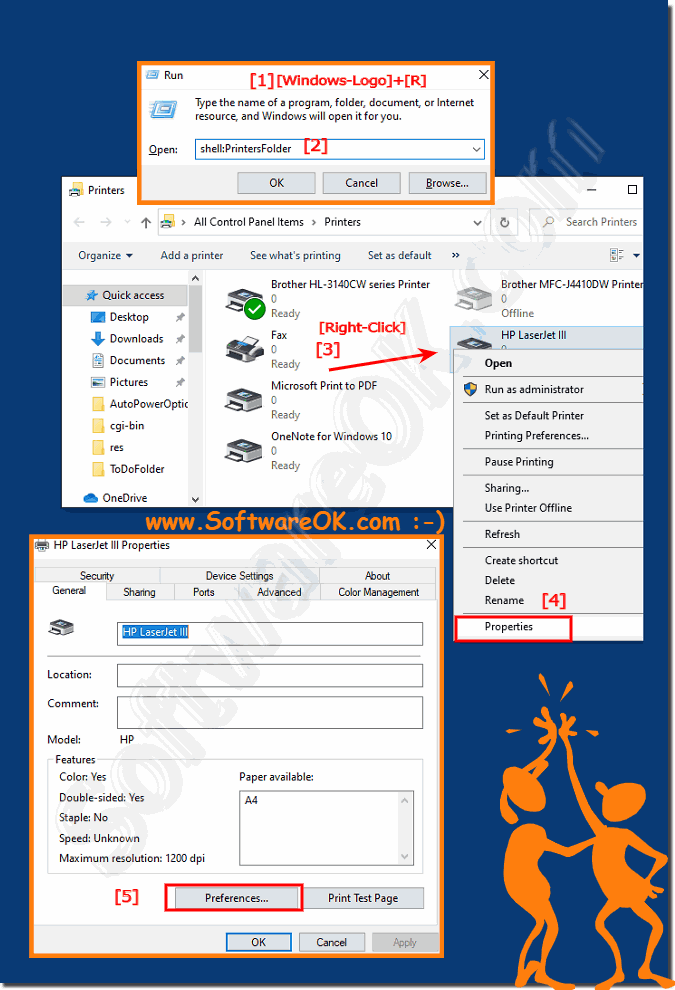
1. Please open the printer directory in Windows 10!

2. Shortcut Windows-Logo + R and the command "shell:PrintersFolder"
(PS: By right-clicking on the printer you can set the printer as the default printer)

3. And open the printer properties / printer settings directly!

(... see Image-1 Point 1 to 5)

Tip:
The Printer Properties dialog box opens with all relevant options for the printer itself, as well as for updating the printer driver, most applications, APPs, desktop programs are then also use the standard settings that you have defined, unless the program already has specific settings for the print job, such as for the MS Office products.

PS: Here in the example the Windows 10 problem printer HP-LaserJet IV!
 
(Image-1) View printer properties on Windows 10!
View printer properties on Windows 10!


Info:


In Printer Settings: Click this button to display a dialog box like the one shown here, where you can select options that are specific to your own printer model. In the Print Settings dialog box, you can usually select different types of paper, choose between color and black and white, adjust print quality, and make last-minute page layout corrections.


-
▲ Back to the top ▲


2.) The printer properties on Windows 10 and 11!


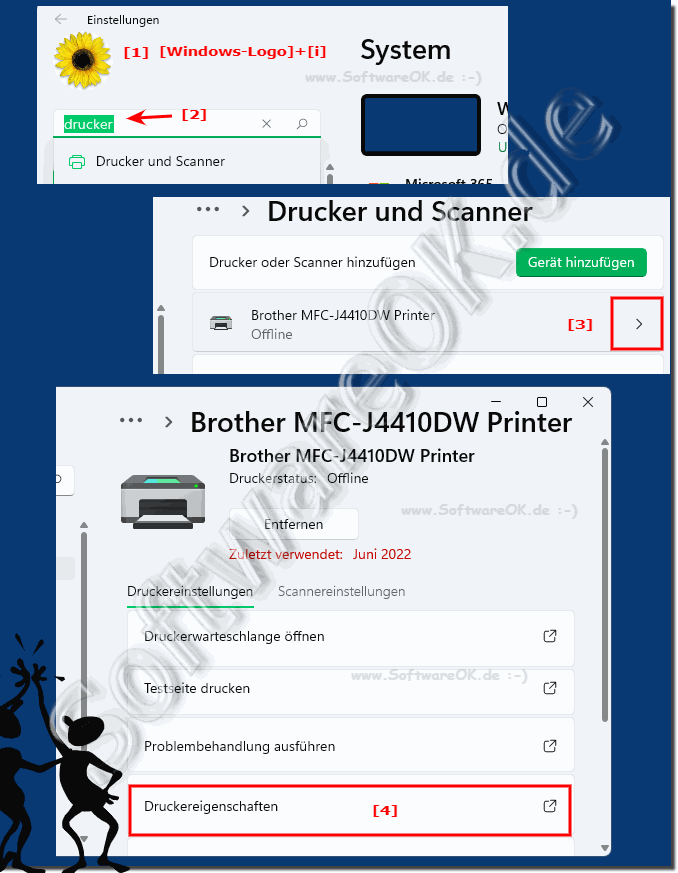
You can use the method described above on all Windows operating systems; under Windows 10 and Windows 11 you have another option to access the print properties, which is via the new Windows 11 and 10 settings, briefly explained here.

1. As always, start the Windows settings with the keyboard shortcut Windows + i

2. Simply enter the term printer in the search field and confirm with Enter or click directly on the result displayed.

3. Now scroll down on the right side to the printer whose properties you want to edit or view.

4. On the right you will see a right arrow Simply click on this and you will be taken to the options for the selected printers and the possibilities.

5. Now at the bottom, you can now see the printer options . By simply clicking on these printer options, the printer options for the respective printer will also open.

( ... see Figure-2, points 1 to 4 ) 


(Image-2) Printer properties in Windows 10 and 11 settings!
Printer properties in Windows 10 and 11 Settings!

-
▲ Back to the top ▲


3.) Why the printer properties on Windows 10 and 11!


Printer properties in Windows serve several important purposes, including:

Customization: You can adjust various settings to tailor your printing experience to your specific needs. For example, you can adjust the print quality, paper size, and duplex printing settings.

Troubleshooting: Printer properties provide access to diagnostic and maintenance tools that can help you troubleshoot common printing problems. You can clean printheads, align cartridges, and check ink or toner levels.

►►  Troubleshoot using a specific printer in Windows 11?

Network and sharing:If your printer is shared on a network, you can configure network-related settings such as: B. Sharing permissions, security settings and connection configurations.

►►  Sharing from the printer on Windows (11, 10, 8.1, ...)

Driver settings: The printer properties allow you to access and change the specific settings of the printer driver, which may affect how your documents are printed and processed become.

Default Printer: You can set a default printer so that Windows knows which printer to use when printing without having to specify a specific printer for each print job.

►►  Set the default printer in Windows?

Advanced options: Advanced settings in printer properties provide more control over how print jobs are spooled, how the printer communicates with your computer, and other technical aspects of printing.

►►  Change standard printer settings in Windows 11, 10, how can you do that?

Information and status: You can access information about your printer, including driver version, hardware details, and printer status, which can help diagnose problems.

►►  How can I change the printer for printing test pages?


Overall, printer properties are an important tool for managing and configuring printers on a Windows computer. They ensure that you can print documents efficiently and troubleshoot any problems that may arise.


Updated on: 11 April 2026 04:21 Windows
Keywords: 1903, 1909, printer, view, properties, windows, 10, without, expertise, displayed, select, print, option, many, programs


Similar information on the page

Windows

... Printer is suddenly gone under Windows 10 and 11 , why?


Due to the running in the background Windows 10 or 11 Update can ever be a new installation of the printer driver required Some users of my program  DirPrintOK  have
Windows

... Enable print logging on Windows 11, 10, 8.1, ... and MS Server


Enabling print logging / protokoll on Windows 11, 10, 8.1, and Windows Server 2019, 2016, 2012, Everyone knows the standard printer settings on
Windows

... Printer Management, Printer Server, Driver, Printers Connections under Windows 11 and 10


In the printer management you can check, for example, whether the installed printer driver was correctly uninstalled under Windows These are so- called
Windows

... To properly print the contents of a folder in Windows 10/11


Its easy to print the contents of a folder under Windows 10 or 11 to hold it on paper You do not always have to print directories with the free directory
Windows

... Use the Photos app on Windows 10 / 11 to print pictures


Its easy to use the Photos app on Windows 10 / 11 to print pictures Everyone probably knows the easy Windows 10 / 11 solution to print multiple images
Windows

... How to print as PDF in Windows 11, 10


Under Windows 10 and 11 you can print a document as a PDF from any application thanks to the integrated "Print to PDF" function Everyone knows the practical
Windows

... Windows desktop print on one page?


To print a Windows desktop as a page / the entire computer screen under Window very easily Everyone is familiar with the Save Window Screenshots directly


▲ Back to the top ▲


11 # APPs # Beginner # Desktop # Download # Explorer # File-System # Folder # Hardware # Install # Internet # Media # Monitor # Network # Office # Power-Options # Printer # Quick-Tip # Registry # Search # Security # Settings # Shortcuts # Software # Sound # Store # System # Tips # Update # User #


Questions for this:
  1. Display of the print properties?
  2. Printer settings do not work with Windows 10 even with a new driver, does it help to change the printer settings?
  3. CHANGE PRINT PROPERTIES FROM THE SYSTEM DEFAULT SETTINGS
  4. Have a Samsung plus Canon and an HP printer now want to save the printer in the properties as my preferred printer with preferred settings as the default?
  5. Where can I find the printers in the Windows 10 PC in the system settings where all connected and installed printers are displayed?
  6. Search the list of all printers which would make sense for my Epson and Brother printers to set a printer as the default printer?
  7. Where can I see my printer properties on the pc?
  8. For example, I have a printer where the setting is set as the default printer. However, if the status of the device changes, even with the print command I do not have the desired standard printer. What can I do for print jobs to get the desired settings?
  9. Cannot see printer properties at Canon?
  10. Search printer settings in windows 10 und 11?
  11. Windows printer properties?
  12. print server properties win 10 und 11?
  13. To save settings on my Dell Windows 10 I do not need any instructions because the printer from HP is the standard printer settings I am looking for, where will I find them?
  14. set print properties win 10 und 11?
  15. For example, I plan to change the default settings because I currently have to change every new print job to find a procedure for the Windows 10 und 11 operating systems as I can change the setting as the default setting for applications with the printer driver I have no problems just looking for a way like me which the default printer settings can change and I should note, are there problems?
  16. Windows server old print properties?
  17. set printer properties windows 10?
  18. I am a user who likes to print mostly always do the same print jobs sometimes sage graphics or private photos and rarely use the printer, most of the time I have to reset the problem on the laser printer when printing documents, is there another way?
  19. Printer server properties?
  20. Open print server properties windows 10 und 11?
  21. Printer properties not working?
  22. Open printer windows 10 und 11?
  23. Set printer properties win 10 und 11?
  24. I want to change printer settings I print a lot and have many printing tasks, but it would make sense to look at the settings on the printer to adjust them, how can I open the printer settings?
  25. Searching different print options for print jobs, while installing from the printer on a DVD forgot to set it?
  26. Printer Properties dialog box?
  27. printer driver properties?
  28. Search example for changing Brother printer settings in windows 10?
  29. Windows 10 print server properties?
  30. Hp printer properties different?
  31. Show Lexmark printer level?
  32. Change printer properties et 2022 windows 10 und 11?
  33. Open printer dialog box in windows 10 und 11?
  34. Windows 10 printer settings properties?
  35. Printer settings in Windows 10 operating system How do I change printer settings?
  36. Windows default printer properties?
  37. Help Printer settings could not be saved without error messages each time the settings made on the printer are not saved?
  38. set print properties windows 10?
  39. Print image properties?
  40. I want to know how to set a printer as the default printer?
  41. How can I move printer properties to the desktop?
  42. What is it and where is the cause, is it due to the authorization that settings on my printer in the network and printer settings even as administrator, what is it that the printer settings are lost?
  43. Show printer properties?
  44. Read out printer properties duplex?
  45. Windows 10 print properties paper type?
  46. Windows 10 und 11 printing properties?
  47. Ie do you open printer properties on the print server?
  48. Search the settings because I want to change them on Windows 10 und 11 or the printer settings to set the selected printer settings as standard?
  49. Change Windows 10 print properties?
  50. Where can I manage settings for example for the standard paper format of the printer and various other settings color, color printer, print quality, color printing, that the desired settings do not have to be reset?
  51. Show printer properties win10?


  + Freeware
  + Order on the PC
  + File management
  + Automation
  + Office Tools
  + PC testing tools
  + Decoration and fun
  + Desktop-Clocks
  + Security

  + SoftwareOK Pages
  + Micro Staff
  + Freeware-1
  + Freeware-2
  + Freeware-3
  + FAQ
  + Downloads

  + Top
  + Desktop-OK
  + The Quad Explorer
  + Don't Sleep
  + Win-Scan-2-PDF
  + Quick-Text-Past
  + RAMagic
  + DesktopDigitalClock
  + Find Same Images
  + Print Folder Tree


  + Freeware
  + WinScan2PDF
  + TheAeroClock
  + MeinPlatz
  + WinBin2Iso
  + DesktopOK
  + RAMagic
  + IsMyMemoryOK
  + StressTheGPU
  + Brightness.Manager.OK
  + PAD-s


Home | Thanks | Contact | Link me | FAQ | Settings | Windows 10 | English-AV | Impressum | Translate | PayPal | PAD-s

 © 2026 by Nenad Hrg ERR2: softwareok.de • softwareok.com • softwareok.com • softwareok.eu
89.843 msec.


>> ☕ Buy SoftwareOK a Coffee ☕ <<


► How do I change the font size in Windows 11 and 12? ◄
► Hide Desktop Icons Show in Windows 7, Help? ◄
► Who should not use Virus Hunting in the Virtual AI Windows World? ◄
► What does restore the clipboard in QTP for Windows 11, 10, ... ? ◄


This website does not store personal data. However, third-party providers are used to display ads,
which are managed by Google and comply with the IAB Transparency and Consent Framework (IAB-TCF).
The CMP ID is 300 and can be individually customized at the bottom of the page.
more Infos & Privacy Policy

....