Software-OK
≡... News | ... Home | ... FAQ | Impressum | Contact | Listed at | Thank you |

  
HOME ► Windows 10 - System ► «««« 23 / 28 »»»»

End processes via the Windows-10 / -11 / -12 command prompt!


Ending the processes via the Windows-10, -11 and -12 command prompt (cmd.exe) is quite easy!


Many who work with Linux or Unix are happy that there is this option under Windows to abort (and start) processes via the command line in the command prompt. Linux gives you a wide variety of command line tools that simply don't exist by default on Windows.


Extensive: ►►   Use taskkill correctly and sensibly with Cmd.exe with examples?


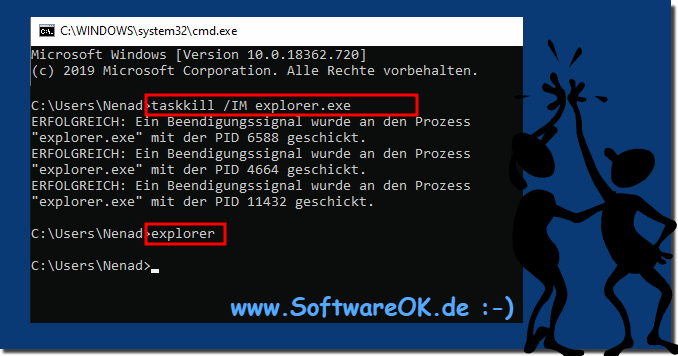
Simple example:

(Image-1) End processes via the Windows 10 command prompt!
End processes via the Windows 10 command prompt!


Info:

When you start an app, the operating system creates a process for an executable file for the app. It contains the program code and its current activity. Windows assigns a special number called a Process Identifier (PID) that is unique to each process. There are a number of reasons why you might want to kill a process and different methods that you can use to kill it. If an app has stopped responding, is consuming a lot of system resources, or is behaving unexpectedly and you cannot terminate it, you may want to kill its process to forcibly close the app. Traditionally, Windows allowed the Task Manager and Command Prompt to be used for these tasks. In addition to these methods, you can use PowerShell.


-
▲ Back to the top ▲


Updated on: 6 September 2024 16:34 Windows
Keywords: system, processes, windows, 11, 10, command, prompt, ending, quite, easy, aps


Similar information on the page

Windows

... Do I have Windows 10 Redstone 4 or 5 or Windows 11?


The last version of Windows 10 Redstone 4, also known as Creators April 2018 Update, is recognizable in the system as a version number Preface to Redstone
Windows

... Convert the FAT32 to NTFS without losing data under Windows-10, -11 abd -12?


Under Windows-10,  -11 and -12  it is easy, for example, to convert USB data carriers that are FAT32 to NTFS without data loss Converting the FAT32 to NTFS
Windows

... Disk check when starting Windows 10 / 11, then black screen?


If Disk Check is started again and again when Windows 10 / 11 starts, and the screen stays black.  This is a bigger problem, some Windows users also report
Windows

... Windows is being prepared - depends on Windows 10 / 11 reboot?


Your computer, laptop, or laptop hangs on shutdown when you see the message "Windows is getting ready, dont turn off the computer." If youve been waiting
Windows

... Repair Corrupted Windows 11, 10, ... System with simple cmd.exe Commands, how to do?


Scan for all Corrupted windows system files and repair incorrect replace with correct MS versions not only for Windows 11 and 10, also for all other Win
Windows

... Find in Windows-10, -11, -12 SSD optimization and defragmenting


Its easy to find and run SSD optimization and defragmenting on Windows-10, -11, -12 So defragmenting the SSD hard drives is not necessary, but optimizing.
Windows

... Enable / Disable Virtualization on Windows 10 / 11 or Server 2019, how to do?


The function, Hyper-V which is responsible for the virtualization under MS Windows  11 / 10 and Server 2022, 2019, 2016, easy enable or disable For example


▲ Back to the top ▲


... System Tip


11 # APPs # Beginner # Desktop # Download # Explorer # File-System # Folder # Hardware # Install # Internet # Media # Monitor # Network # Office # Power-Options # Printer # Quick-Tip # Registry # Search # Security # Settings # Shortcuts # Software # Sound # Store # System # Tips # Update # User #


Questions for this:
  1. What commands are used in Windows 11 Command Prompt to kill processes?
  2. Are there any special commands for killing processes in Windows 12?
  3. How do I use the command prompt in Windows 10 to manage processes?
  4. What commands are useful for killing processes in Windows 11?
  5. How do I control processes in Windows 10 using the command prompt?
  6. How do I use cmd.exe in Windows 11 to start processes?
  7. How can I efficiently end processes in Windows 11?
  8. How do I use Command Prompt in Windows 10 for process control?
  9. What commands are useful in the Windows 10 command prompt for process management?
  10. How can I end processes in Windows 12 using cmd.exe?
  11. How do I manage processes in Windows 11 and Windows 12 using the Command Prompt?
  12. Are there any differences in killing processes in Windows 12 and Windows 10 using Command Prompt?
  13. How can I end and start processes in Windows 11?
  14. What commands are there for ending processes in the Windows 11 cmd.exe?
  15. How to kill processes in Windows 10 using Command Prompt?
  16. What options do I have to end processes in Windows 10?
  17. Is there a special method for ending processes in Windows 11?
  18. What are the differences when ending processes in Windows 12 compared to Windows 10?
  19. What tips are there for process management in Windows 12?
  20. How do I start the command prompt in Windows 11 for process control?
  21. How can I start processes in Windows 11 using cmd.exe?
  22. How do I manage processes in Windows 10 and Windows 11 using Command Prompt?
  23. Can I use Command Prompt to start processes in Windows 12?
  24. Are there differences in process management in the Windows 12 command prompt compared to Windows 11?
  25. What commands do I need to start processes in Windows 11 using cmd.exe?
  26. What steps are necessary to end processes in Windows 12?
  27. How do I end a process in Windows 10 using cmd.exe?
  28. What do I need to consider when managing processes in Windows 12 using the command prompt?
  29. What are the differences in process management in Windows 10 and Windows 11?
  30. Which commands are useful in the Windows 10 cmd.exe for ending processes?
  31. How do I start processes in Windows 10 with the cmd.exe?
  32. What options do I have in the Windows 12 command prompt for process control?
  33. Can I kill processes in Windows 12 using cmd.exe?
  34. What tips are there for ending processes in Windows 11?
  35. How can I start and end processes in Windows 11?
  36. How to start a process in Windows 10 using Command Prompt?
  37. How do I end processes in Windows 11 and restart them via the command prompt?
  38. What are the steps to kill a process in Windows 11 using command line?
  39. What commands are most important for the command prompt in Windows 10?
  40. How is ending processes in Windows 10 and Windows 11 different using the command prompt?
  41. How do I use the command prompt in Windows 12 for process management?
  42. Can I also start processes in Windows 11 using the command prompt?
  43. Which commands are useful for ending processes in Windows 12?
  44. How do I start processes in Windows 10 via the command line?
  45. How do I end a process in Windows 12 using the command line?
  46. What tools in the command prompt can be used for process control in Windows 12?
  47. What commands for ending processes are available in Windows 12?
  48. What commands are there for starting processes in Windows 11?
  49. How do I use the command prompt in Windows 12 to manage processes?
  50. How do I use cmd.exe in Windows 10 for process management?


  + Freeware
  + Order on the PC
  + File management
  + Automation
  + Office Tools
  + PC testing tools
  + Decoration and fun
  + Desktop-Clocks
  + Security

  + SoftwareOK Pages
  + Micro Staff
  + Freeware-1
  + Freeware-2
  + Freeware-3
  + FAQ
  + Downloads

  + Top
  + Desktop-OK
  + The Quad Explorer
  + Don't Sleep
  + Win-Scan-2-PDF
  + Quick-Text-Past
  + Print Folder Tree
  + Find Same Images
  + Experience-Index-OK
  + Font-View-OK


  + Freeware
  + IsMyTouchScreenOK
  + Print.Test.Page.OK
  + OpenCloseDriveEject
  + ColorConsole
  + IsMyLcdOK
  + DesktopDigitalClock
  + ClassicDesktopClock
  + PreventTurnOff
  + QuickMemoryTestOK
  + PAD-s


Home | Thanks | Contact | Link me | FAQ | Settings | Windows 10 | gc24b | English-AV | Impressum | Translate | PayPal | PAD-s

 © 2026 by Nenad Hrg ERR2: softwareok.de • softwareok.com • softwareok.com • softwareok.eu
72.044 msec.


>> ☕ Buy SoftwareOK a Coffee ☕ <<


► How to restore Master Boot Record on Windows XP? ◄
► Adjust tolerance to find similar images when searching for images? ◄
► How to change the drive letter in Windows 10/11, DVD and USB drives? ◄
► When did Windows 11 come out? ◄


This website does not store personal data. However, third-party providers are used to display ads,
which are managed by Google and comply with the IAB Transparency and Consent Framework (IAB-TCF).
The CMP ID is 300 and can be individually customized at the bottom of the page.
more Infos & Privacy Policy

....