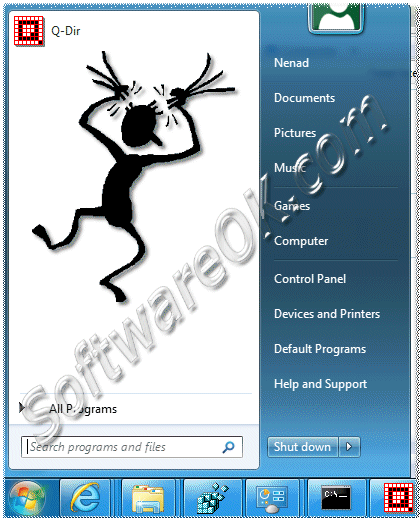
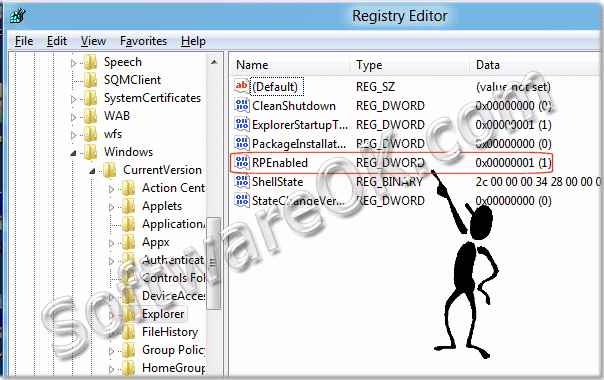
To activate the old Start menu in Windows-8 change the registry key: HKEY_CURRENT_USER\Software\Microsoft\Windows\CurrentVersion\Explorer
And set the value RPEnabled from "1" to "0". (... see Image-2)
Or, please start the cmd.exe [Win-Logo]+[R] cmd.exe + [ENTER]
and type the following command: reg add "HKCU\Software\Microsoft\Windows\CurrentVersion\Explorer" /v RPEnabled /t REG_DWORD /d "0"
Microsoft Windows [Version 6.3.9600]
(c) 2013 Microsoft Corporation. All rights reserved.
C:\Users\Nenad>reg add "HKCU\Software\Microsoft\Windows\CurrentVersion\Explorer" /v RPEnabled /t REG_DWORD /d "0"
Value RPEnabled exists, overwrite(Yes/No)? yes
The operation completed successfully.
C:\Users\Nenad>
(Image-1) Activate the Start menu in Windows 8
(Image-2) Activate at Windows-8 the Classic Start menu
For Windows 8.1/8 with 30 gigabytes to reach rather, it depends on how many other programs you must install on the boot disk partition or you want. I would
There are several ways to open the Disk-Management in Windows 8.1 or 10. Here are four methods to open the Windows 8.1 / 10 Disk-Management . Solutions:
There are several ways to open, find or start the Computer Management in Windows 10, 8.1 Here are four methods to open the Computer Management in Windows
The system requirements of Windows 8.1 and Windows 10 are the same as for Windows 7 and Server 2012 / 2016. Windows 10 / 8.1 system requirements 64-bit x64