Please use CTRL+W Keyboard Shortcut in Q-Dir or easy use the left mouse double click, this also closed the tab!
2.) Change the default folder on Windows 11, 10, ... etc.!
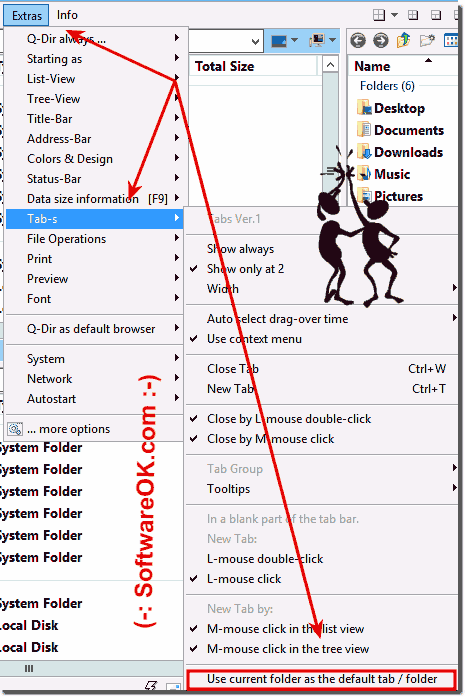
main menu ► Extras ► tabs ► use current folder (... see Image-1)
Info: If the folder no longer exists, is the default Folder on Windows 10 This PC and on Windows 7 My Computer!
Because in Windows 10 the My Computer icon is called This PC!
(Image-1) Explorer window have 1 or more tabs and default folder tab?
Info:
Sets, it is said, are said to be "easier and faster" to be "creative and productive". As with a browser, it is possible to open a new tab by clicking on a "+" icon. Afterwards, not only websites are available but also applications. The projects created via Windows 10 sets are synchronized across all Windows 10 computers, where the user logs in with his Microsoft account data.
This is a Windows-7 and Windows 10/11 old list view sorted column bug but in the newest Quad-Dir is this Problem fixes and resolved If Please disable the
Oooo Yes, this is a "Adobe Reader" problem on windows 11, 10 and 8.1 is everything fine And for old Windows OS is that a solution for Thumbnails: adobe_pdf_x64_fix
Hello I want to move files from one folder tab to another, do I need both folders side by side in Q-Dir?
What useful functions do I have in the context menu of the individual tabs in Quad Explorer to duplicate folders from a window tab with the current Q-Dir tab?
What can the tabs in the Q-Dir file explorer do I lose on Windows 10?
Search programs file explorer with the tabs and key combinations to use the tabs?
I discovered it via the menu item Extras Tabs but the tab view as options and entry is well hidden?
Do I need the tabs that I can drag from one window to the other with the mouse and put in the Q-Dir table bar?
Find the command Q-Dir Tab Clone or key combination as functions not to show more tab bars to show, I would be happy, that or I have in the tab bar in front of the 4 Explorer views what is activated under Display and Options, I overlooked something ?
With the QDir-Tabs I can copy files from one tab to another, but what about the corresponding tab, can you also move them?
On Windows 10 the Quad Explorer open tabs to use folders in the individual Explorer in tabs, what do I do to use it better?
Otherwise I prefer to use Commander but the access to libraries and workstations is better in Q-Dir and tab behavior, the menu bars and the Explorer key combinations can be better. Can you integrate it in the subsequent versions?
Two windows tab in one on Windows 10 so that you have multiple windows so simple tabs?
Now I have discovered the Explorer tab in Q-Dir on my Windows 10 Activate the tab bar is just what keyboard shortcut to open the Explorer tabs do I have?
The tabs in the Q-Dir file explorer are gone and they cannot be activated when the program is restarted, what am I doing wrong?
Search settings in the individual explorer views to adjust to open them faster?
There are tabs / tabs in the browser for example the Internet Explorer does the Quad Explorer also have tabs?
This tab function in Windows 10 File Explorer Q-Dir has no problems?
Does the Quad Explorer also have tabs in a window or tabs?
You files are moved from tab to tab in Explorer 1 to Explorer Tab 3, so if I want to copy instead Q-Dir will take no action while holding down the key why is that?
Activate Win 10 Q-Dir tabs and under Windows the activate tab is missing from Quad Explorer search settings in Q-Dir?
Need to reactivate the tabs in the file explorer Q-Dir to use it correctly on Windows 10?
Have several tabs open in the left file explorer, holding the file with the mouse and dragging it to the other tab is great. Can I set the exporter tab in a different color?
Is the Feature Tab Explorer in Q-Dir correct and easy to use?
I have the tabs in the Q-Dir file explorer and don't want to use them, can I deactivate them?
I need more than a second explorer window i need 4 what key combination do i press?
Where can I find the settings to control tab behavior in Q-Dir, are there settings for tab behavior or shortcuts or shortcuts?
Can I also open new tabs in open folders on Windows 10 via the Q-Dir tab bar or do I have to drag something in the tab bar to open them as tabs in Quad Explorer?
Really supper under Windows 10, 8 and 7 who support the tabs in the Windows 10 Quad Explorer, in order to switch clearly and effectively through individual windows and folders, someone can show me how you can use the free Q-Dir tab bar effective use in Explorer?
Is there access to recently opened tabs and files in Quad Explorer that find that duplicating this tab function is good, but who I accidentally exclude is the tab WAY?
Help the settings in Q-Dir are very extensive and the Explorer tabs also in the menu item Extra Tabs I did not find the settings the button to restore them, if someone upgraded you to close undo tabs it was great, or did I miss something?
I use 4 Explorer by default, if the source file and destination folder are on the same hard drive the files are not copied. What am I doing wrong?
Using Quad Explorer tabs?
Can I view Q-Dir tabs with multiple windows in one in the Quad File Explorer on Windows 10 on Microsoft?
Search tutorial move tabs to another window on Quad Explorer?
In windows 10 explorer in q-dir opens to manage many folders in the tabs?
I have disabled tabs in the Explorer windows, how do I reactivate them?