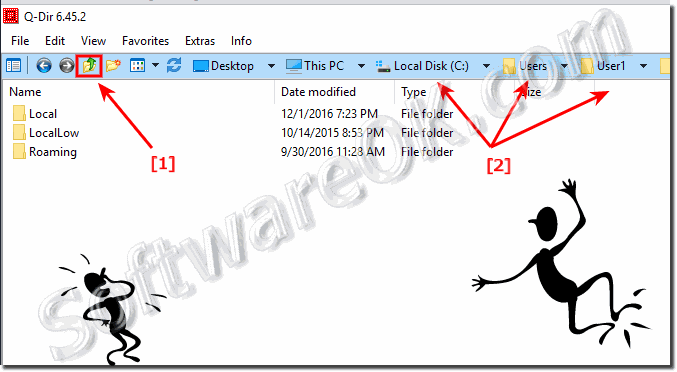
It is very easy to navigate to up a folder in each explorer View of the Quad-Directory Explorer!
1.) ALT + [UP ARROW]
2.) Back button
3.) Icon Click "up a folder" (... see Image-1 Arrow-1)
4.) L-mouse double-click in the free space in list view
5.) Click the Vista address bar. (... see Image-1 Arrow-2)
The 32-bit version of Quad-Dir have small problems under x64 but Q-Dir x64 works without problems on Windows, 11, 10, Windows 7, XP or Windows Vista x64.
The Quad-Directory-Explorer startup parameters or arguments for folders eg. directories: Parameter Example 1: Folder Path for all four File Explorer Views
If some of the explorer windows have 1 or more tabs, easy remove them ergo close the tabs and define a default folder when open new Tab Content / Solution
This is a Windows-7 and Windows 10/11 old list view sorted column bug but in the newest Quad-Dir is this Problem fixes and resolved If Please disable the
Oooo Yes, this is a "Adobe Reader" problem on windows 11, 10 and 8.1 is everything fine And for old Windows OS is that a solution for Thumbnails: adobe_pdf_x64_fix
There is of course always something to improve: With the Freecommander, you can quickly switch to any higher-level folder by clicking on the desired position in the address line for long paths. It's very intuitive and quick. The copying of the address line (which is probably required less often than the navigation) was handled by extra functions.
Opinion in Q-Dir.
I still don't have the option to display the entry ".." for parent folders, that would be great, then it would be perfect. (w7 x64, qdir v4.11, ie8)?
I need root point under every folder. Sometimes I feel uncomfortable when I find files and then go back to the root of the directory. If it is possible and feels easy to create a root point under each folder, please reflect mine?
Couldn't the \ .. folder (one up) be shown in the individual windows?
Is it possible to display the higher-level directory in the file list (with "..")? So that when you click on it you slide one level higher?