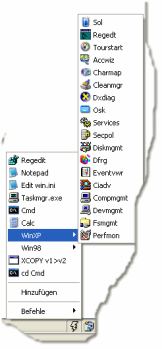
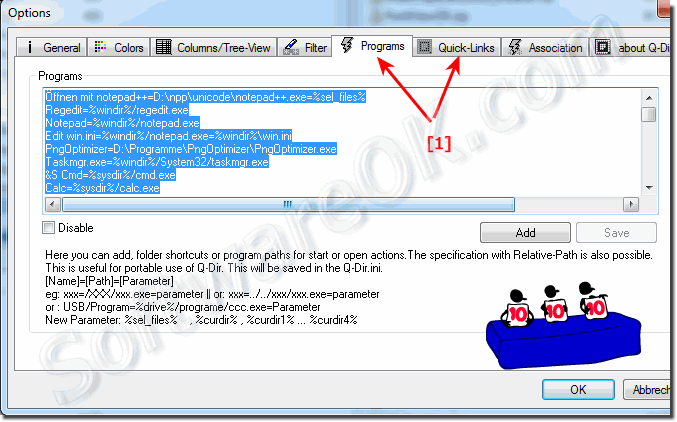
Program Starter portable files and installed, programs and location?
It is quite easy to open files in a portable installation or installed with Windows 11, 10, ... programs in Q-Dir!
For example to allow to use 3rd party search, rename, directory backup and comparison, rename, ... app! The Shortcut Ctrl + S is Program Starter and Ctrl + Q is for Quick Links!
Oh yes, if you hold down Ctrl, the programs will start in admin mode!
1.) Info about the program Starter in Q-Dir
Use Quick links or Program-Run for this (screenshot 1+2).
Use the char "=" for splitting. For example Name=Path=Arguments
Starting with version 6.46, you can also define the working directory! Who needs it will know why!
Name=Path=Arguments=Work directory
Some example: Relativ Path Example
Name1=../dir/program.xxx.exe=%curdir%
Name1=../dir/program.xxx.exe="%curdir%" <For Paths with Blank Space ""< Name1=../dir/dir/program.xxx.exe=%all_files% Drive of Q-Dir:
Name2=%drive%/dir/program.xxx.exe=%curdir%
......
Placeholder for Parameters:
%windir% for Windows Folder.
%sysdir% for System(32) Folder.
%sel_files% for Selected files.
%sel_files1% .... %sel_files4% for Selected files in view 1,2,3 or 4.
%all_files1% .... %all_files4% for all files in view 1,2,3 or 4.
%all_files% for all files.
%curdir% for Folder in active view.
%curdir1% .... %curdir4% for Folder in view 1,2,3 or 4.
Placeholder for locations and Work Directory:
%windir% for Windows Folder %sysdir% for System(32) Folder %desktop% for my Desktop %appdat% for my Appdat %personal% for my personal files
%drive% for curient Q-Dir.exe Drive
(for example: "L:\" when Q-Dir locations L:\Programs\Q-Dir\Q-Dir.exe)
from 6.46
when run or open for example C:\XXX\fff.bat is:
%fdir% = C:\XXX
The 32-bit version of Quad-Dir have small problems under x64 but Q-Dir x64 works without problems on Windows, 11, 10, Windows 7, XP or Windows Vista x64.
Hi,
Love Q-Dir, still hoping to see you implement a way of associating files on a portable installation with programs in the portable locations. This way if running Q-Dir from a portable install, files are opened using programs from that same location vs on the host machine. Below please find a link to a small utility that currently provides this functionality.
http://www.portablefreeware.com/index.php?id=1317
Thanks for your hard work and keep it up.
Bob
Love Q-Dir. Could you add:
Open a command prompt window here prompt?
Ths way I could open a DOS window after navigating thru Q-Dir.
Main class (com.actalead.Dds2RestBridgeService) is in Dds2RestBridge-8.1.0.0-SNAPSHOT.jar, so my launcher.bat is:
java -cp lib-c2-Dds2RestBridge/* com.actalead.Dds2RestBridgeService -appDomain 2 -admDomain 0 -hqName SHQ24 -autoActivate true -configSource dds
On Windows 7 (used at office), double click on launcher.bat start my program but on Windows 10 or Windows Server this isn't working, java said:
Error: cannot find main class com.actalead.Dds2RestBridgeService
To launch my program, I have to use Window Explorer.
Please add a simple search current folder and sub folders function. The FIND function just opens the file-explorer app which is crap. or maybe allow to use 3rd party search app integration. thank you!