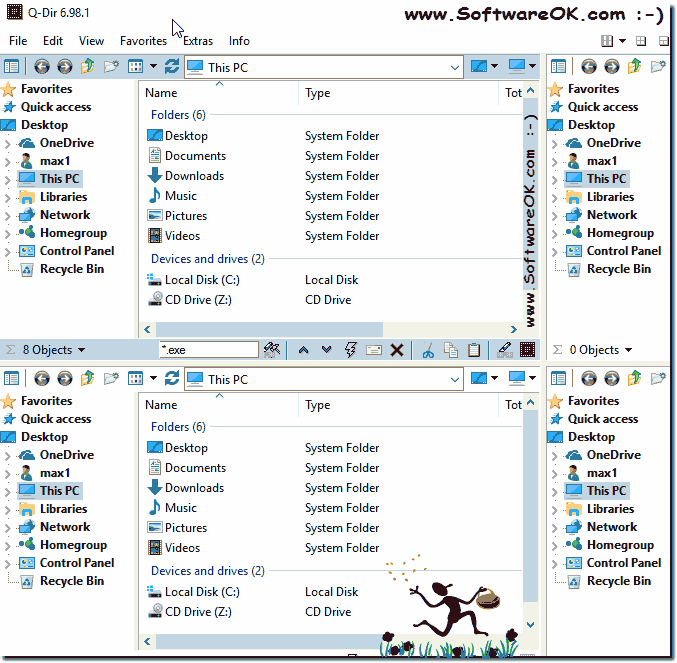
Can i have a separate tree view for each explorer list view?
Please activate the Tree-Views for each explorer list view in Q-Dir, it doesn't matter whether is it Windows 11, 10, 8.1 Server 2019, 2016 ... or other Win OS!
Simply activate the directory structure for each Explorer view.
Here are the for file explorers with activated directory tree, via the navigation symbol in the top left of the respective address bar. This is automatically used again by the file explorer when saving is activated.
You do not have to activate the directory tree again and again!
Tip:
You can create individual folder combinations on the desktop, with different view settings and directory tree combinations, which is very practical for individual file management tasks!
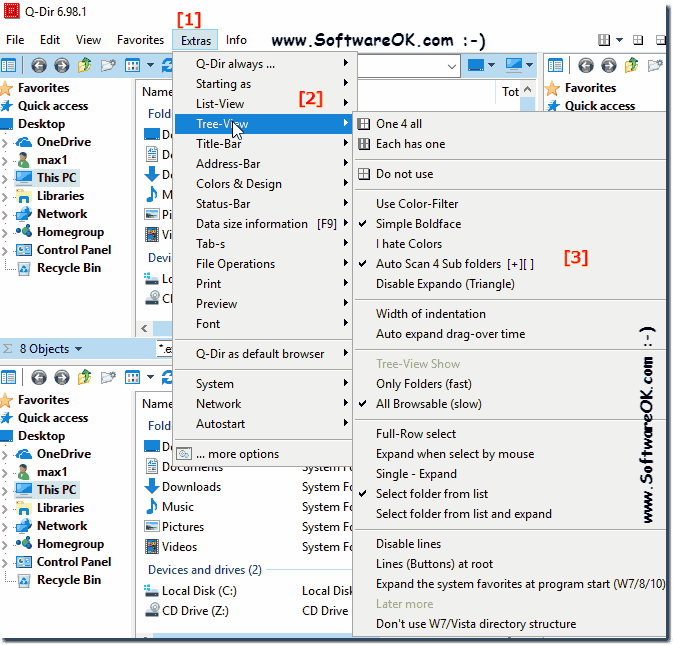
4.) Explorer view directory tree settings eg no triangles!
Of course you can also configure many parameters for directories and their contents in Windows 10 like in any other Windows system. However, the folder settings in Windows 10 have a slightly more advanced view compared to other similar operating systems. And you can access the configuration in several ways.
(Image-4) Settings for tree view for all explorer views!
By optimizing or customizing the folder view in the Q-Dir Explorer, you can organize your workspace comfortably. And with the sorting option for a particular column, finding content on a particular basis is easy. And adjust how the folders are displayed to you, as well as the function white of the directory structure!
5.) Brief information about the directory structure!
Since the release of Windows 7, users can use folders as well as libraries to help them find files and folders no matter where they are. This will also be displayed in the Q-Dir directory tree.
The library is a virtual directory of files and links that are collected in one place. Files are grouped by type without having to move the file itself. All data entering the library undergoes indexing, which, depending on the file type, contributes to the contextual search, which also benefits the alternative file manager Q-Dir.
Many people with "visual impairments" use system-wide font magnification, which makes more sense. Q-Dir uses the "System Settings". You can read about it
There are different ways to see folder size, file size and eg the file extension in the individual File Explorer layers The elegant folder size solution
Here is the solution, how to change the preview filter settings in Q-Dir, of course no mater whether it is Windows 11, 10, MS Windows Server OS Content:
Easy add google or bing search to the i-net feature in free File Explorer, for Windows 11, 10, 8.1 and 7 Here are a few examples ;- Google EN=http://www.google.com/search?hl=en&q=%s
Currently "Q-Dir" used the MS-Explorer Windows search feature [CTRL+F] or [F3] and [Alt + F3] selected item ergo folder search. In the foreseeable future
I was looking for the "Tree" icon in each window while the "One 4 All" tree was being displayed on the left. But that icon appears only after the "One 4 All" tree is turned off by clicking on the "Each has one" menu item. I really like the ability to toggle between "One 4 All", "Each has one" and "None has one" - that is so useful!
In Windows Explorer, or Tablacus Explorer, I have the option to open the subfolders on the left side of the column. That's clearer for me. Is this also possible with the Q-Dir? Did I miss this option with the many setting options?
If I either click or hit Enter on Extras > Tree-View > Tree-View Show I note that the setting is not activated and, if I navigate to the setting, it's not the one selected.
I'm now using the Quad Explorer for Windows Q-Dir v 6.82 and have a question: I click on the "Each has one" menu item and the "Folder Pane" that was on the left disappears - I do not get a folder pane in any of the other windows. I can bring it back by clicking on "One 4 all", but it goes again if I click on "Each has one". I thought I did have a "Folder Pane" in each of the other windows when I was using v5.74, but maybe I am mis-remembering. Am I doing something wrong?
Tip: You can make additional helpful settings via the Extra directory structure menu. The e.g. In Windows 10 Explorer are not so possible!
I see we can use Ctrl E to get a tree view in Left box but what about being able in any box. Keep up the excellent work the Quad Explorer for Windows ?
Q-Dir the Quad Explorer for Windows is great, so thanks.I've tried the feature on the Extras menu, Tree View, All have one, but all it seems to do is the tree view disappears. I expected it to divide and have a separate tree view for each list view, but that's not what happened. Am I misunderstanding the feature perhaps? Or is it not working as intended? Thanks:https://www.softwareok.com/?seite=faq-Q-DIR&faq=32
Tip: You can make further helpful settings via the Extra directory structure menu. Which are not possible in Windows 10 Explorer!
Hi. If I select a folder tree "For all" windows, nothing happens.