... News || Home || Impressum || Contact || Guestbook


HOME » Faq » FAQ - file management freeware Q-Dir


««« Answer 27 of 75 »»»

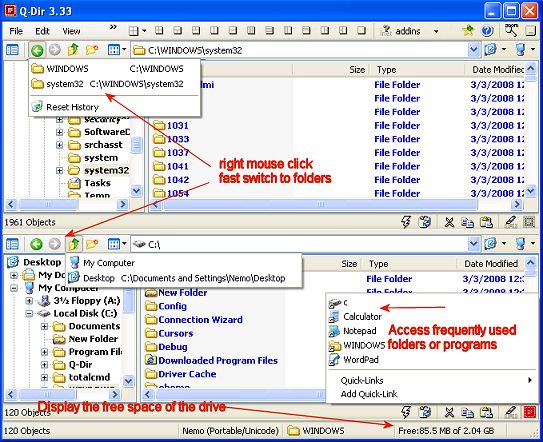
Has the Q-Dir fast access to frequently used programs?


create a new shortcut for the program !
Drag the shortcut to the Quick-Folder.

see also:
How to Create a Shortcut on the Desktop:


Q-Dir is suitable for Microsoft Windwos :
Servers 2000 / 2003 / 2005 / 2008 Win 98 / XP / Vista and Windows Seven x64 and x86
FAQ: file management freeware Q-Dir
22. Help! Default bold font is killing my eyes!
23. To make Q-Dir truly portable!
24. Dragging doesn"t work at all when dragging from a network (mapped) drive!
25. Q-Dir 3.31 and Windows 98?
26. Has Q-Dir a single tree that can be used for all panes?
27. Has the Q-Dir fast access to frequently used programs? ***
28. The columns chaos - a never-ending story?
29. The 7-zip context is not in Q-Dir under Win Vista x64. Why?
30. Can I somehow disable the click navigation sound ?
31. I"m visually impaired, how do I enlarge the font on my Q-Dir?
32. How the hell can I have a separate tree view for each list view?

»»

  Q-DIR FAQ-INDEX

»»

  My question is not there in the FAQ
  
Go to FAQ:
Q-DIR | DesktopOK | SoftwareOK | Win-7 | System-General |


Quick-Link'son-screen keyboardStress your LCDDead pixel policyVisual impairments?
HomeThanksContactLink meFAQ InBox / InBox_grEnglish-AVImpressumTranslatePayPal
  •  © 2010 by Nenad Hrg // softwareok.desoftwareok.comsoftwareok.eu •  
SGT : 0.906 sek.


desktop icon manager   Restore the positions of icons   Dearest icon locations   Folder-Shortcuts   Easy File Management with Q-Dir   Favorit Desktop Icon Layout   Vista address bar   Microsoft Store   How to browse FTP directory   Stress your LCD   windows7 FAQ