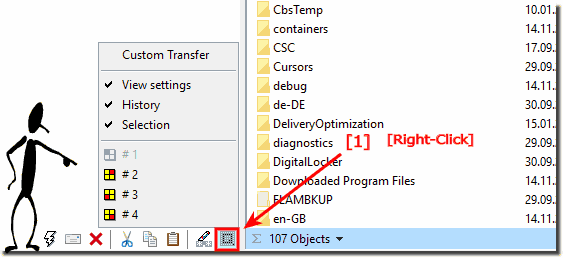
Clone eg transfer the folder from Explorer View-1 to View-2?
To transfer the folder from View-1 to View-2 ergo clone the tab or each explorer view with all settings in Q-Dir!
In the Quad Directory Explorer you can not only transfer the folder path between the individual views or windows within Q-Dir, but also the view settings, directory path, selected objects (files / folders) and even the complete explorer history.
In short, you can clone the individual Explorer views with everything you need.
1.) Transfer folders from File Explorer 1 to Explorer 2!
Simply right-click on the Q icon (icon) and target window in the window to be duplicated . The menu items above the Q-Dir symbol are self-explanatory. If you are overwhelmed, you can contact me: ... click here.
Press click with the right mouse button on the Q-Icon (See Image-1)!
2.) Why does the transfer from File Explorer 1 to Explorer 2 make sense?
Transferring File Explorer 1 settings to Explorer 2 makes sense because it allows you to use your usual settings and preferences in the new File Explorer. These include, among others: The file and folder view:
You can choose whether you want to use the detailed, icon or tile view.
The columns in the file list: You can customize the size and order of the columns in the file list.
If you adopt the settings and preferences from File Explorer 1, you won't need to configure them again when you use the new File Explorer. This is especially helpful if you're new to the new File Explorer.
Transferring settings from File Explorer 1 to Explorer 2 is a simple process. You can do this from File Explorer settings.
Here are some specific examples of situations in which transferring settings from File Explorer 1 to Explorer 2 makes sense:
You want to use your usual view for files and folders.
You want to use the columns in the file list in the same order and size.
You want to use the same highlighted icons for files and folders.
You want to use the same history folders.
Transferring file settings from File Explorer 1 to File Explorer 2 can be useful if you want to create a consistent work environment, save time, or ensure that certain customizations or configurations are the same in both File Explorers. Here are some reasons why this might make sense:
Consistency:
The same settings and configurations in both file explorers ensure a consistent user experience. This can be helpful to avoid confusion and increase efficiency.
Time Saving: Manually setting up settings in a file explorer can be time-consuming. Being able to copy or transfer these settings will save you time and effort.
.. etc.
The exact steps to transfer settings depend on the operating system used and specific requirements. In Windows you can e.g. Export File Explorer settings and configurations and import them to another computer. Similar functions may also exist in other operating systems or applications.
3.) More information about this File Explorer topic!
If you are not sure whether the transfer from File Explorer 1 to Explorer 2 makes sense for you, you can first try out the new File Explorer in a test folder. This way you can see for yourself whether the new features and improvements meet your needs.
Here the Solution how to to block the Filemanager to open *.zip, *.rar *.cab folder and others in explorer view Please click on the main menu, the item:
Hi, I usually don’t contribute to free software as I can often take it or leave it; mainly because the software stops being supported soon after – it’s like a kiss of death. But as I have mentioned to you before (using this email address) Q-Dir is indispensible to me now. An idea, is it possible to make the four panes drag-and-drop? It would be easier to be able to arrange the panes rather than change the drives in each one.
Answer: is this not god: https://www.softwareok.com/?seite=faq-Q-DIR&faq=16
First of all, let me tell you that your software is the one I was looking for for a while. As I tested many, I found sometimes a very usefull little button that would open the same directory from a window to another one. This is very usefull, when people like me, are managing many directories and especially when you found your target and want to copy or move files.
Hope my suggestion is clear enough, otherwhile do not hesitate to contact me for more.?