|
Update on: 15 April 2024
Suitable for : Windows 11, Windows 10, 8.1, 7, ... , Server 2012-2019, 2022, x64, x32, x86
DesktopOK - Program History New in version 11.21 // 15 April 2024
• Made small improvements to DesktopOK tools.
• Updated language files in the desktop storage app (DesktopOK).
• Tests conducted for compatibility with upcoming build for MS Windows 11.
New in version 11.19 // 3 April 2024
• Small bug fixes on Windows 10 and 11
• General optimization in DesktopOK
• Language file updates
New in version 11.18 // 18 March 2024
• Small finishing touches in the DesktopOK Windows Tools
• Important language file updates
New in version 11.17 // 27 February 2024
• Optimization and various fixes for all MS Windows OS
• General fixes and small tweaks in Desktop-OK
New in version 11.16 // 21 January 2024
• Corrections and improvements in the DesktopOK Windows Tools
• Language file updates
New in version 11.15 // 21 December 2023
• DesktopOK language files update
• Small corrections in the desktop OK tools
New in version 11.13 // 2 October 2023
• Important update of the language files in Desktop-Okay and small improvements as well as general optimization.
New in version 11.12 // 2 October 2023
• Improvements in uninstalling Desktop O.K.
• General tuning and improvements.
• Important update to the DesktopOK language files
New in version 11.09 // 13 September 2023
• Kleine Korrekturen in DesktopOK und einige Anpassungen für Windows 10 und 11
• DesktopOK-Sprachdateien Aktualisierung
New in version 11.11 // 20 September 2023
• General optimization in DesktopOK
• Bug fix: in the DesktopOK x64 version under Windows 11 Home
• Update the DesktopOK language files
New in version 11.09 // 13 September 2023
• Small fixes in DesktopOK and some adjustments for Windows 10 and 11
• DesktopOK language files update
New in version 11.08 // 6 September 2023
• Update of the language files in DesktopOK
• Further improvements in various Windows tools
• Small improvements for Windows 11
New in version 11.07 // 25 August 2023
• Improvements in save desktop layout on all MS Windows OS
• Small adjustments and update of the language files in DesktopOK
New in version 11.06 // 11 August 2023
• Various improvements in DesktopOK
• General improvements in the DesktopOK Windows Tools
New in version 11.01 // 1 August 2023
• New code sign certificate for DesktopOK.exe
• Important tests from DesktopOK for the next MS Windows 11 update
• Updates to the language files in DesktopOK
New in version 10.88 // 14 June 2023
• Small tests and adjustments for the new MS Windows 11 update
• Updated language files in DesktopOK for all Windows operating systems
• Small adjustments in Desktop-OK, and new language: Romanian
• Thanks to SANATESCU Ioan Teodor for the Romanian language
New in version 10.81 // 24 April 2023
• Small bug fixes and general optimization in DesktopOK for MS Windows
• Update of the language files in D.OK
New in version 10.77 // 22 March 2023
• General improvements in the DesktopOK Windows Tools
• Small bug fixes under Windows 11
• General optimization in DesktopOK
New in version 10.71 // 6 March 2023
• Important update of the language files
• General fine-tuning and improvements in Desktop-OK for all MS Windows OS
New in version 10.66 // 10 February 2023
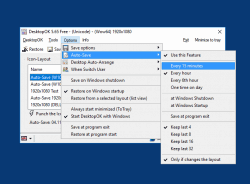
• Improvements in : auto save desktop icons feature.
• General fixes in DesktopOK and update of the DesktopOK language files
New in version 10.61 // 5 January 2023
• Correction at: Minimize all windows
• Update of the DesktopOK language files
• General fixes in DesktopOK
New in version 10.55 // 16 December 2022
• Small tuning in the DOK Tools and general optimization
• Improvements and updating of the language files
New in version 10.51 // 23 November 2022
• General corrections and small fine-tuning for Windows 11 22H2
• Updating the language files Desktop-OK
New in version 10.44 // 30 October 2022
• Improvements in the DesktopOK Windows Tools.
• Updating the language files and general adjustments
New in version 10.34 // 4 October 2022
• In the PowerOptionsOK, change the color in the notification area to match the respective power plan on Windows
• General Adjustments Fine Adjustments Desktop Okay for Windows
New in version 10.33 // 27 September 2022
• Verification and testing of DesktopOK on Windows 11 22H2
• General corrections and small fine adjustments in DesktopOK
New in version 10.21 // 21 September 2022
• Improvements in: dark theme / darker mode in DesktopOK on MS Windows 11 and 10
• Improvements and updating of the language files
New in version 10.16 // 30 August 2022
• Small corrections and adjustments for the next MS Windows 10 Build
• General optimization in DesktopOK for all MS Windows
• Update of DesktopOK language files
New in version 10.01 // 6 August 2022
• Update of the language files and corrections for Windows 11 Home and the DesktopOK Windows Tools.
• Small adjustments for the new build of Windows 11
New in version 9.99 // 28 July 2022
• Important adjustments in Desktop-OK application for older MS Windows NT operating systems
• Small corrections Update of the language files
New in version 9.97 // 11 July 2022
• Important customization in the DesktopOK Windows Tools.
• Some improvements in DesktopOK and update of language files
New in version 9.95 // 28 June 2022
• Save desktop layout improvements on multi-screens and virtual desktops!
• Small fine tuning and update of the language files
New in version 9.91 // 10 June 2022
• System-wide deactivation / activation of the dark theme via the Tools menu, System
• Update of the language files in DesktopOK improvements in the Windows Tools
New in version 9.88 // 18 May 2022
• Small corrections in the DesktopOK Tools
• Update of the language files
• Testing on MS Windows 11 OS for next build
New in version 9.85 // 4 May 2022
• Bug fix in pixel color query tool in DesktopOK tools to get the R,G,B color values from a desktop pixel.
• Update of the language files in for MS Windows OS.
New in version 9.83 // 22 April 2022
• Corrections and improvements in the DesktopOK Windows Tools
• Updates to the language files
New in version 9.81 // 11 April 2022
• Corrections in the dark theme under MS Windows 11 and 10 operating systems
• Updates to the language files in Desktop OK for all MS Windows OS
New in version 9.77 // 30 March 2022
• General improvements in restoring desktop icon layouts
• Important update of the language files
New in version 9.73 // 14 March 2022
• General improvements in the DesktopOK Windows Tools
• Update of the language files in Desktop-OK for all MS Windows OS
New in version 9.71 // 1 March 2022
• Optimization and various fixes for all MS Windows OS
• Important update of the language files in DesktopOK
New in version 9.66 // 16 February 2022
• General fine-tuning and improvements in Desktop-OK for all MS Windows OS
• Important update of the language files
New in version 9.61 // 1 February 2022
• Small bug fixes on Windows 11
• General optimization in DesktopOK
• Update of the language files
New in version 9.55 // 14 January 2022
• Update of the DesktopOK language files
• Small corrections in the Desktop-OK Tools
• Small tuning and general optimization in DesktopOK for all Windows OS
New in version 9.51 // 23 December 2021
• Important update of the language files in DesktopOK
• Improvements and fine-tuning in Desktop-OK for MS Windows OS
• Small corrections in the dark theme support
New in version 9.44 // 7 December 2021
• Optional: Support for dark theme / modes in Desktop OK for MS Windows 11 and 10
• Improvements in contrast design and higher DPI settings when working with poor eyesight
• General fine-tuning and improvements.
• Update of the language files
• PS: Dark Theme can be deactivated via the desktop OK menu
New in version 9.33 // 14 November 2021
• Bug fix: Windows 11 at 4K screen and changed DPI settings
• New languages: simplified Bosnian / Croatian / Serbian
• Update of the language files
• Many thanks to Mujo for the simplified Bosnian / Croatian / Serbian language.
New in version 9.31 // 3 November 2021
• Again customizations and improvement in DesktopOK when customize the DPI values!
• Verification and testing of DesktopOK on Windows 11
New in version 9.23 // 18 October 2021
• Small corrections in DesktopOK and some optimizations for Windows 10 and 11
• Update of the language files in DesktopOK
New in version 9.21 // 10 September 2021
• Adjustments for the current Windows 10 and the new Windows 11
• Various corrections in the DesktopOK Windows Tools
• Update of the language files in DesktopOK
New in version 9.19 // 24 August 2021
• New corrections and adjustments under MS Windows 11 OS
• Update of the language files in Desktop-OK
New in version 9.15 // 30 July 2021
• Bug fixes under Windows 11
• Various corrections and adjustments, as well as further tests under Windows 11
• Update of the language files
New in version 9.11 // 9 July 2021
• Verification of DesktopOK on MS Windows 11 OS
• Small adjustments for Windows 11
• Update of the language files in Desktop-OK for Windows ;-)
New in version 9.01 // 24 June 2021
• Small corrections in DesktopOK x64
• Update of the DesktopOK language files
• General fine-tuning and improvements.
New in version 8.99 // 21 June 2021
• General optimization in DesktopOK
• bug fix: in DesktopOK x64 version at Windows 10 Home
• Update of the DesktopOK language files
New in version 8.98 // 17 June 2021
• New: DesktopOK no longer appears in the loudspeaker mixer if it is not activated in DOK
• Improvements in the DesktopOK-Windows-Tools
• Update of the language files
New in version 8.91 // 14 June 2021
• General improvements plus fine tuning in DesktopOK for all MS Windows OS
• New Code Sign Certificate for DesktopOK.exe
• Update of the language files
New in version 8.88 // 25 May 2021
• General improvements in the DesktopOK-Windows-Tools
• Small corrections and update of the DesktopOK language files
New in version 8.81 // 14 May 2021
• General optimization in DesktopOK for all MS Windows
• Small corrections and adjustments for the new MS Windows 10 update
• Update of DesktopOK language files
New in version 8.77 // 13 April 2021
• Important update of the language files
• Small corrections and adjustments in Desktop-OK for MS Windows operating systems
• General fine-tuning and improvements.
New in version 8.71 // 16 March 2021
• Small optimization and general fine-tuning in DesktopOK for all MS Windows OS
• Update of the Desktop OK language files
New in version 8.66 // 25 February 2021
• Important update of the DesktopOK language files
• Improvements in the DesktopOK Windows Tools
• New language in DOK: Portuguese-Portugal
• Many thanks to TEC Store for the Portuguese language.
New in version 8.61 // 17 February 2021
• Small bug fixes when restoring the desktop icon layouts
• Update of the language files
• General optimization in DesktopOK
New in version 8.55 // 15 February 2021
• Improvements: with new symbols that were created after saving of the symbol layout
Time optimization when restoring the desktop icon positions under MS Windows
• Update of the language files and general optimization in DesktopOK
New in version 8.44 // 2 February 2021
• Improvements in the DesktopOK Windows Tools
• Important update and general optimization in DesktopOK
New in version 8.41 // 19 January 2021
• Improvements in: Installation and deinstallation of DesktopOK
• Bugfix: With Unicode paths
• Important update of the DesktopOK language files
• Small improvements in DOK and new languages: Spanish (Venezuela)
• Many thanks to Ricardo A. Rivas for the Spanish language (Venezuela).
New in version 8.38 // 8 January 2021
• Bug-Fix: When scaling the desktop e.g. below W10 DPI 150 %
• Small improvements in DesktopOK
• Update of the language files
New in version 8.33 // 1 January 2021
• More options in Windows metric tool for settings of the Windows metric especially for Win 10.
• Small corrections in DesktopOK
• Update of the language files
New in version 8.21 // 21 December 2020
• Update of the DesktopOK language files
• Small corrections in DesktopOK Tools
New in version 8.11 // 10 December 2020
• New: Minimize all windows if the mouse pointer does not move for a certain time!
• Update of the DesktopOK language files
• Small corrections in DesktopOK
New in version 8.08 // 24 November 2020
• Changes and improvements in the Desktop-OK Tools
• Update of the DesktopOK language files
New in version 8.03 // 19 November 2020
• Bug-Fix in Multilanguage Feature
• Update of the DesktopOK language files
• New languages: Thai, Vietnamese, Hindi, Hebrew, Persian and the Afrikaans
• Many thanks to Huy for the Vietnamese language.
• Many thanks to The Hindi Man for the Hindi language.
• Many thanks to DJ Israel for the Hebrew language.
• Many thanks to African-Man for the Afrikaans language.
• Many thanks to Chanchana for the Thai language.
• Many thanks to Iran M.C. for the Persian language.
New in version 8.01 // 17 November 2020
• Bug-Fix in Uninstall Feature
• Update of the DesktopOK language files
• New languages: Filipino, Malay and Indonesian
• Many thanks to A. Lincoln for the Filipino language.
• Many thanks to Indonesian Super Girl for the Indonesian language.
• Many thanks to Washington for the Malay language.
New in version 7.99.1 // 7 November 2020
• DesktopOK x64 version bug fix
• Update of the DesktopOK language files
New in version 7.99 // 5 November 2020
• General optimization in DesktopOK
• Update of the DesktopOK language files
New in version 7.97 // 29 October 2020
• Improvements in the DesktopOK Windows Tools
• Important update of the DesktopOK language files
• General optimization in DesktopOK
New in version 7.95 // 2 October 2020
• Some improvements in DesktopOK and update of language files
• Important customization in the DesktopOK Windows Tools.
New in version 7.93 // 23 September 2020
• Small tuning and general optimization in DesktopOK for all Windows OS
• Important update of the DesktopOK language files
New in version 7.87 // 11 September 2020
• Improvements in: Windows desktop icon change size and view, save!
• Small corrections in DesktopOK and some optimizations
New in version 7.81 // 31 August 2020
• Improvements in: x64 ergo 64-bit version of the desktop ok under Windows
• Update of the DesktopOK language files and small corrections in DesktopOK
New in version 7.77 // 21 August 2020
• Small corrections in DesktopOK
• Important update of the DesktopOK language files
• Improvements in the DesktopOK Windows Tools
New in version 7.71 // 7 August 2020
• Small fine-tuning and general optimization for all Windows 10 OS
• Important update of the language files
New in version 7.62 // 28 July 2020
• Bug-Fix Windows 7 and 8.1: switch from administrative mode and back
• Important update of the language files
New in version 7.61 // 26 July 2020
• Bug-Fix: in the optional auto update service via https (ssl)
• Important update of the language files
New in version 7.55 // 17 July 2020
• Small adjustments for MS Windows Web Server 2019, 2016!
• Small corrections in the tools menu and tray menu
• Important update of the desktop OK language files
New in version 7.48 // 8 July 2020
• Bug-Fix: in Optional autoupdate service via https (ssl)
• Update of the DesktopOK language files
New in version 7.47 // 7 July 2020
• Freely adjustable Auto Update Server on user request
• Update of the DesktopOK language files
New in version 7.44 // 24 June 2020
• New: switch from administrative mode and back
• Update of the DesktopOK language files
• Small fine-tuning, and preparation for further functions in DesktopOK
New in version 7.41 // 27 May 2020
• Improvements in: Installation and deinstallation of DesktopOK
• Correct change from administrator instillation to non admin mode
• Important update of the DesktopOK language files
New in version 7.31 // 25 May 2020
• Small fine-tuning, important update of the language files
• Improvements in: Minimize the other programs in the taskbar
New in version 7.27 // 17 May 2020
• New: Option that confirmed when deleting "Desktop Icons Layouts" on Windows!
• Bug: When recognizing the standard system language setting from 27 languages in DesktopOK
• Small adjustments and improvements
• Thanks to the translators for the variety of languages in DesktopOK
New in version 7.21 // 15 May 2020
• Important update of the DesktopOK language files
• Improvements in the DesktopOK Windows Tools
• Small corrections in DesktopOK
New in version 7.17 // 8 May 2020
• Small fine-tuning, important update of the language files
• Improvement in: GetPixelColor Desktop Pixel Color determine RGB / RGBA
New in version 7.11 // 3 May 2020
• New: the silent install as alternative to normal installation of Desktop OK for Windows all OS!
• Important update of the Desktop OK language files
• Small improvements
New in version 7.07 // 1 May 2020
• Important update of the DesktopOK language files
• Small tweaks DesktopOK Windows Tools
• Test on MS Server 2019
New in version 7.01 // 24 April 2020
• Update of the DesktopOK language files
• Extension in: Alt Drag window function, drag, move, resize on Windows 10, 8.1, ...
• Small finishing touches
New in version 6.99 // 18 April 2020
• New: Save the icon layout with date and time format via the command line
• General fine-tuning in DesktopOK on Windows OS
New in version 6.93 // 8 April 2020
• Bug-Fix: DesktopOK wrong program icon
• Improvements in the DesktopOK Windows Tools
New in version 6.91 // 1 April 2020
• Small fixes and retests for Windows 10 Build 2004 / April 2020
• Update of the DesktopOK language files
New in version 6.88 // 5 March 2020
• Small corrections and compilation due to positive false virus alert by AVAST, although no virus was present!
• Important update of the DesktopOK language files
New in version 6.84 // 20 January 2020
• Optimization in DesktopOK and improvements for Windows 10
• Important update of the DesktopOK language files
• Improvements in the Explorer-Friend
New in version 6.81 // 23 December 2019
• Improvements in: the screenshot function on Windows 10, 8.1, ...
• Improvements in: ... Change Windows Desktop Icon size and view, save!
• Important update of the language files
New in version 6.79 // 7 December 2019
• Small corrections and compile due to positive false virus alert on Windows 10, although no virus was present!
New in version 6.77 // 6 December 2019
• General optimization in DesktopOK
• Important update of DesktopOK language files
• Improvements in the DesktopOK Windows Tools
New in version 6.71 // 10 November 2019
• New: open the Program path via Alt Right-Click Title-Bar-Menu
• Important update of the language files
New in version 6.69.1 // 30 October 2019
• Recompile because of G-Data Total Security totally blocked the program even though there was no virus!
• Important update of the language files
New in version 6.68 // 24 October 2019
• Small corrections and compile due to positive false virus alert on Windows 10, although no virus was present!
New in version 6.67 // 23 October 2019
• Tests and verification for Windows 10 November 2019 Update Build 18362
• Important update of the language files
• Small fixes in DesktopOK
New in version 6.65 // 15 October 2019
• Important update of the language files and general optimization
• General fine tuning and optimization in desktop ok for W10, 8.1
New in version 6.61 // 8 October 2019
• New: Make Always on Top, To-Tray, Transparency for all Windows on 10, 8.1, ...!
• Important update of language files and general optimization
New in version 6.59 // 19 September 2019
• Improvement in: GetPixelColor Desktop Pixel Color detect RGB / RGBA
• Small tuning and general optimization in DesktopOK
New in version 6.56 // 10 September 2019
• Easier: Grant access with folder protection on Windows 10!
• Important update of language files and general optimization
New in version 6.52 // 5 September 2019
• Important update of DesktopOK language files
• General fine tuning and optimization in the desktop ok
New in version 6.51 // 30 August 2019
• New optional: parameter /report for load Desktop-Icon Layout from file
• General optimization in DesktopOK
New in version 6.48.1 // 27 August 2019
• New optional: save DesktopOK window position
• General optimization and improvements for the next Windows 10 build
• Bug-Fix: in the Screenshot function with multiple monitors
New in version 6.46 // 16 August 2019
• Force the portable mode and create DesktopOK.ini
• Important update of DesktopOK language files
• The network paths can be used //ServerY/Path/DesktopOK
New in version 6.45 // 12 August 2019
• Improvements in the DesktopOK Windows Tools
• General optimization in DesktopOK
• Important update of DesktopOK language files
New in version 6.44 // 1 August 2019
• Improvements in: x64 ergo 64 Bit version of desktop ok on Windows
• Improvements in: save and load the desktop icon's position from a file
• General optimization in DesktopOK
New in version 6.42 // 22 July 2019
• Improvements in: minimize the other programs to tray
• Bug-Fix: for windows 10 home x32 edition
• General optimization in DesktopOK
• Update of the language files
New in version 6.41 // 16 July 2019
• Direct Uninstall from the program via Menu, DesktopOK, Folder, Uninstall
• Improvements in the uninstall feature
• Update of the language files DesktopOK
New in version 6.37 // 3 July 2019
• Small fine tuning Win 10 Build 1903 and general optimization.
• Update of the language files DesktopOK
New in version 6.36 // 25 June 2019
• Update of the language files DesktopOK
• Small corrections and general optimization DesktopOK Windows Tools.
New in version 6.35 // 18 June 2019
• DesktopOK is again with Code Signing certificate
• Update of the language files DesktopOK
• Small corrections for Windows 10 especially MS-Surface devices
New in version 6.34 // 14 June 2019
• Bugfix: Title bar version number
New in version 6.33 // 13 June 2019
• Bug-Fix: in Optional autoupdate service via https (ssl)
• Small tuning and general optimization in DOK.
• Language file update in DesktopOK
New in version 6.31 // 9 June 2019
• Bug: Hiding in desktop icons with multiple monitors, now all taskbars are hidden.
• Language file update in DesktopOK
New in version 6.25 // 26 May 2019
• Bug :Code Signing certificate and update of the language files DesktopOK
• DesktopOK is currently without this certificate because it only causes problems
New in version 6.21 // 20 May 2019
• Small tuning and general optimization.
• Language Files Update in DesktopOK
New in version 6.16 // 24 April 2019
• Small fine tuning and general optimization in DOK.
• Update of DesktopOK language files plus customization in DesktopOK Windows Tools.
New in version 6.11 // 11 March 2019
• Important: Bug fix in the x64 version due to false compiler setting
• Small corrections and recompilation of DesktopOK, due to malfunctions
• Updating the language files
New in version 6.06 // 27 February 2019
• Size optimization in DesktopOK
• And again, minor changes for MS Windows 10 OS
• Update of Language Files
New in version 6.04 // 14 February 2019
• Some improvements in DesktopOK for use with Windows 10.
• Customizations in the DesktopOK Windows Tools
New in version 6.03 // 28 January 2019
• Some improvements in DesktopOK for use on Windows 10.
• Language Files Update in DesktopOK
New in version 6.01 // 19 January 2019
• New: Optional installation and uninstallation feature
• New: Optional autoupdate service via https (ssl)
• New: Optional, automatic notification when new version is available
• Small tuning and general optimization in DOK.
• Updating the language files in DesktopOK
New in version 5.82 // 31 December 2018
• Small fine tuning and general optimization in DOK.
• Update of DesktopOK language files plus customization in DesktopOK Windows Tools.
New in version 5.81 // 19 December 2018
• And again, minor changes for MS Windows 10 OS
• Update of the DesktopOK language files small minor fixes
New in version 5.79 // 29 November 2018
• Update of DesktopOK language files plus customization in DesktopOK Windows Tools.
• Small fine tuning and general optimization.
New in version 5.77 // 22 November 2018
• Small fine tuning and updating of the language files in the desktop snow
• Adjustments for the x64 version and general optimization
New in version 5.76 // 6 November 2018
• Bug Fix: There was error message 0xc000007b on first startup on some windows operating systems
New in version 5.75 // 5 November 2018
• Small improvements and update of language files plus fine tuning in DesktopOK.
New in version 5.73 // 25 October 2018
• Update of DesktopOK language files plus customization in DesktopOK Windows Tools.
New in version 5.71.1 // 10 October 2018
• Bug-Bix: the camera-icon was displayed at the programm start, even if the screenshot option from the To-tray was not activated.
• ... Quick, how to! use the Screenshot Function in Desktop-OK.
New in version 5.71 // 9 October 2018
• Improvements in the screenshot function.
• New: Activate / Create screenshot from the To-tray.
• Update of the language files and fine tuning for the Windows 10!
• ... Quick, how to! use the Screenshot Function in Desktop-OK.
New in version 5.67 // 4 October 2018
• Successful test under the new build of MS Windows 10 the October Update 2018!
• Update of the language files and fine tunes for the new Windows 10 October update!
New in version 5.65 // 21 September 2018
• New program arguments:
• /spacing = Save or restore the desktop Icon Spacing
• /size = Save or restore the desktop icon size
• Update the DesktopOK language files
• Command line option to save or load the icons layout directly from a file?
New in version 5.61 // 17 September 2018
• Again improvements and changes in the Desktop-OK Tools for Windows
• Update the DesktopOK language files
New in version 5.56 // 8 September 2018
• Minor changes for MS Windows 10 OS
• Update of the DesktopOK language files plus
New in version 5.55 // 14 August 2018
• Update of DesktopOK language files plus minor changes / corrections for MS Windows x64 OS.
New in version 5.51 // 24 July 2018
• Important adjustments and improvements in the tools of DesktopOK.
• Important adjustments for Windows 10 / Server 2016
New in version 5.46 // 18 July 2018
• Bug Fix: Windows 10 Redstone 4 / Server 2016 and small minor fixes
• Small changes and improvements in the Desktop-OK Tools
• Update of the DesktopOK language files
New in version 5.44 // 4 July 2018
• Bug-Fix: in desktop-ok screnshot feature on Windows 10 / Server 2016
• Update of the DesktopOK language files
New in version 5.42 // 27 June 2018
• Bug-Fix: For some desktop icon layouts, a Windows error message appeared on the screen when restoring the desktop icons
• Update of the DesktopOK language files
New in version 5.41 // 26 June 2018
• Many small changes and improvements in the Desktop-OK Tools
• Small corrections for Windows-10 Redstone 4 (V. 1804)
• Update of the DesktopOK language files
New in version 5.33 // 16 June 2018
• Bug-Fix: WM_DISPLAYCHANGE message is sent to all windows when the display resolution has changed.
• Update of the desktop OK language files
New in version 5.31 // 11 June 2018
• Bug fix: Windows 10 Build 1804 Redstone 4 and small minor fixes
• Minor improvements in the Desktop OK Tools
• Update of the desktop OK language files
New in version 5.27 // 31 May 2018
• Small corrections When you restore the new icons, pointless message on screen on some systems!
New in version 5.26 // 30 May 2018
• Small improvements in the Desktop-OK Tools update the language files small and cosmetic ergo beauty fixes and corrections.
New in version 5.26 // 30 May 2018
• Small improvements in the DesktopOK Tools update the language files small and cosmetic ergo beauty fixes and corrections.
New in version 5.25 // 25 May 2018
• Test on Windows 10 Update Build 1804 - 17134 (Redstone 4)
• Small corrections if restore the New Icons to free Locations.
• Update of the language files.
New in version 5.21 // 11 May 2018
• New: Change the System Fonts, Title, Caption, Menus, Icons in Windows 10, 8.1!
• Small improvements in the DesktopOK Tools update the language data and small corrections.
New in version 5.18 // 29 April 2018
• Code Signing certificate and update of the language files DesktopOK
• Small corrections and compile due to positive false virus alert on Windows 10, although no virus was present I hope in future less with certificate.
New in version 5.17 // 27 April 2018
• Bug Fix: Pointless message when saving the DesktopOK * .dok file and updating the language files.
New in version 5.15 // 23 April 2018
• Possibility to start DesktopOK via the main menu in admin mode.
• Well suited for various DesktopOK tools when working in admin mode.
• Enhancement in Explorer-Friend
• Update of the language files.
New in version 5.12 // 8 April 2018
• Small improvements in the DesktopOK Tools update the language data and small corrections.
New in version 5.11 // 31 March 2018
• Bug fix in the main menu of DesktopOK, updating the language files and small adjustments in DesktopOK.
New in version 5.08 // 24 March 2018
• Small fixes and recompiles of DesktopOK, for false virus warning
• Avast antivirus, although no virus was present plus Update of the language files in DesktopOK.
New in version 5.07 // 20 March 2018
• Corrections in the function: Change the Windows Desktop Icon Size on Windows 10.
• Update of the language files in DesktopOK plus small settings.
New in version 5.06 // 12 March 2018
• Important adjustments and improvements in the tools of DesktopOK.
• Update of the speech data in DesktopOK plus small cosmetic ergo beauty fixes and corrections.
New in version 5.05 // 4 March 2018
• Small corrections and recompiling of DesktopOK, due to false virus warning
• By Windows Defender, although no virus was present.
New in version 5.03 // 28 February 2018
• Bug Fix in new tool: Explorer-Friend in DesktopOK and update of the language files.
New in version 5.01 // 15 February 2018
• Minor corrections / recompile of DesktopOK due to, false virus alert and virus Avast container.
• Update the language files in DesktopOK plus small settings.
New in version 4.99 // 11 February 2018
• New tool: Explorer-Friend in DesktopOK.
• New: Overwrite existing icon layout.
• Bug-Fix: Auto-save desktop icon location.
• Update of the language files in DesktopOK plus small changes.
New in version 4.94 // 24 January 2018
• Corrections in the Windows Metric Tool when changing the Desktop Icon Spacing ergo Distances especially Win 10.
• Update of the language files in DesktopOK plus small settings.
New in version 4.93 // 5 January 2018
• Small corrections and rebuilding/recompiling DesktopOK because virus alert (Trojan: Win32/HackerPeter666)
• from Windows-Defender on Windows-10, although no virus was present.
• Updating of the language files in DesktopOK
New in version 4.92 // 2 January 2018
• Improvements in : auto save desktop icons feature.
• Updating of the language files in DesktopOK
New in version 4.91 // 22 December 2017
• Improvements in Save on Windows shutdown and Restore on Windows startup
• Updating of the language files in DesktopOK
New in version 4.89 // 1 December 2017
• Further improvements and minor adjustments in DesktopOK for Windows 10
• Updating the language files in DesktopOK
New in version 4.88 // 9 November 2017
• Updating of the language files in DesktopOK.
• Improvements and minor adjustments in DesktopOK for Windows 10 and Server 2016
• Customizations for Windows Seven
New in version 4.85 // 13 October 2017
• Small fixes in AutoHideMouseCursor when used on notebooks, laptops and Tablet PCs on Windows 10, plus language files Update.
New in version 4.81 // 10 October 2017
• New: Pixel color query, can be started via the notification area (tray) of the taskbar.
• New: Test the Touch screen or TV for the multitouch functionality on Windows.
• See: Start MultiTouch test and Query Pixel Color from the taskbar
New in version 4.77 // 5 October 2017
• Updating of the language files in DesktopOK.
• Improvements and minor adjustments in DesktopOK
New in version 4.76 // 25 August 2017
• Small adjustments in Desktop-OK, and new language: Slovak.
• Thanks to Milan K. for the Slovak language
New in version 4.74 // 3 August 2017
• Improvements and minor adjustments in DesktopOK plus Updating of the language files in DesktopOK.
New in version 4.72 // 7 July 2017
• Update of the language files in DesktopOK plus small adjustments
• Improvements and minor adjustments in DesktopOK for Windows-10 (Creators Update).
New in version 4.71 // 18 May 2017
• Bugfix in the time setting, for the hide mouse cursor function.
New in version 4.69 // 7 May 2017
• Small corrections and rebuilding/recompiling DesktopOK because virus alert (Trojan: Win32/Xapretrtzs.M!flock)
• from Windows-Defender on Windows-10, although no virus was present.
• Update of the language files in DesktopOK plus small adjustments.
New in version 4.66 // 18 April 2017
• Edit the desktop icon layouts names via F2.
• Improvements and minor adjustments in DesktopOK for Windows 10 Creators Update.
New in version 4.64 // 24 March 2017
• Update of the language files in DesktopOK plus small adjustments
New in version 4.63 // 18 March 2017
• 1. The DesktopOK.exe is now also Unicode
• 1b. The DesktopOK_Unicode.exe will be removed from the download
• 2. Update of the language files in DesktopOK plus small adjustments
• The reason is that the users use the Ansi version this is not so good from Windows XP and higher!
New in version 4.62 // 8 March 2017
• New Feature: Desktop window to foreground:
• 1. Desktop should be activated and brought to the foreground when any part of it is clicked
• 2. Disable the mouse wheel on the desktop
• Read this: ... Windows desktop in the foreground, at click!
New in version 4.61 // 20 February 2017
• Save and adjust the desktop icon Size:
• Desktop icon size: Small icons (32), Medium icons (48,64), Large icons (96), Small icons (16, 24, 32) (Text right-aligned).
• Change the Desktop Icon Size: Via Menu, Tools, Windows-Metric.
• Save via menu, Options, Save options.
• Optional: Save at program exit and restore at program start.
• Small adjustments under Windows 10.
• Read this: ... Change Windows Desktop Icon Size and View ,plus save!
New in version 4.55 // 2 February 2017
• Small BugFix in Desktop-OK for Windows-10 and 8.1
New in version 4.52 // 12 January 2017
• 1. BugFix in DesktopOK command line /save /silent and /load /silent
• 2. Update the language files in DesktopOK plus small adjustments.
New in version 4.51 // 21 December 2016
• 1. BugFix in the Desktop-OK auto hide mouse cursor function after Autoupate in Windows 7.
• 2. Improvements In the Tools and To-Tray menu.
• 3. New Option: When Switch User, Save & Restore, Windows positions and size plus Desktop icons
• 4. New tool: Screenshot (beta function).
• 5. Improvements for Windows-10.
• 6. Update of the language files in DesktopOK.
New in version 4.47 // 9 December 2016
• New feature: Save and restore icon spacing via Menu, Options, Save Options
• Updating of the DesktopOK language files.
New in version 4.46 // 6 December 2016
• BugFix in Desktop-OK when recognizing the screen resolution if higher DPI values are used,
• or for native screen resolutions (Especially with 4K / ULTRAHD).
• Updating of the DesktopOK language files.
New in version 4.44 // 3 November 2016
• Small adjustments and extensions of the tools in Desktopok plus update of the language files.
New in version 4.42 // 13 October 2016
• Small corrections and rebuilding/recompiling DesktopOK because virus (Trojan: Win32/Fethar.B!cl) alert
• from Windows-Defender on Windows-10, although no virus was present.
New in version 4.41 // 17 September 2016
• Bugfix: occasional crash in DesktopOK under Windows 10 at some system configurations.
• Small adjustments in Desktop-OK and update of the language files!
New in version 4.36 // 28 June 2016
• Small corrections and rebuilding/recompiling DesktopOK because virus (Trojan) alert
• from Windows-Defender on Windows-10, although no virus was present.
New in version 4.35 // 20 May 2016
• Small adjustments in Desktop-OK and update of the language files!
New in version 4.34 // 10 May 2016
• When restoring and / or saving the desktop icon position, a command to the system will be sent, to also save the symbol Settings and / or Update.
New in version 4.33 // 5 May 2016
• Bug fix: When restoring under Windows-10, especially on laptops e.g. notebooks plus updating of the language files in DesktopOK.
New in version 4.31 // 3 May 2016
• Bug fix: When restoring the selected icon layout in Windows 7 and Windows-10.
New in version 4.29 // 19 April 2016
• Small adjustments in Desktop-OK, and new language: Spanish.
• Thanks to McM-2016 for the Spanish language
New in version 4.28 // 7 March 2016
• New Feature in Tools: Small and simple tool to show the Memory-Usage in the notification area (tray), activated this via the Tools, Tray-Features, Memory-Usage in tray!
New in version 4.27 // 29 February 2016
• Small corrections and rebuilding/recompiling DesktopOK because virus alert (Trojan: Win32/Varpes.M!plock)
• from Windows-Defender on Windows-10, although no virus was present.
New in version 4.26 // 16 February 2016
• Improvements and small adjustments in DesktopOK for Windows-10 and Windows-Server 2016!
• Update of the language files in DesktopOK.
New in version 4.24 // 14 January 2016
• From this Version by default, the DesktopOK.ini will be created in the folder %APPDATA%/DesktopOK
• For portable use, please create (or copy) in DesktopOK working directory the DesktopOK.ini.
• Corrections in the tool Windows metrics and update of the language files in DesktopOK.
New in version 4.21 // 29 December 2015
• New Feature in Tools: Get pixel color, is a lightweight desktop color spy tool to get R, G, B color from an desktop pixel.
• Update of the language files in DesktopOK
New in version 4.19 // 2 November 2015
• Improvements and small adjustments in Desktop-OK for Windows 10.
• New Feature in Tools: Small simple tool to show the CPU-Load in the notification area (tray), activated this via the Tools, Tray-Features, CPU-Load in tray!
New in version 4.18 // 15 October 2015
• Bug-Fix in the DesktopOK Tray-Menu (Notification Area).
• Improvements and small adjustments in Desktop-OK for Windows 10.
New in version 4.16 // 21 July 2015
• Full functionality of Desktop-OK on Windows 10 tested with Build 10162.
New in version 4.15 // 7 July 2015
• New Feature in Tools: Ctrl + Alt + F4 feature, kill the Foreground Window .
• Update of the language files in DesktopOK
New in version 4.14 // 27 June 2015
• Placeholder for options, save options, Custom Text! (see DesktopOK FAQ 12)
• ... new save options for custom text!
New in version 4.05 // 6 April 2015
• New option: Options, Save options, Custom text
• Small adjustments in Desktop-OK, and new language: Catalan.
• Thanks to Alfonso Sanchez from the Valencia for the Catalan language
New in version 4.04 // 11 March 2015
• Adjustments in DesktopOK for Windows 10.
New in version 4.02 // 23 December 2014
• Update of the language files and small adjustments in DesktopOK.
New in version 4.01 // 6 November 2014
• Again customizations and improvement in DesktopOK when customize the DPI values!
• Verification and testing of DesktopOK on Windows 10 Technical Preview.
New in version 4.00 // 9 October 2014
• Adjustments and improvements in DesktopOK, when customize the DPI values in the system display settings!
New in version 3.99.9 // 26 September 2014
• Bug-Fix in the option, window, to tray via right click on the close button.
• New function: temporarily disable Aero via tools, system!
New in version 3.99.5 // 14 September 2014
• Some Corrections in DesktopOK for x64 and updating of the language files.
New in version 3.99.3 // 21 August 2014
• Improvements for Windows Server 2012 and update of the language files.
New in version 3.99 // 31 July 2014
• Corrections of some strings in DesktopOK and updating the language files for DesktopOK
New in version 3.98 // 21 July 2014
• Small fixes and improvements.
• Update of the language files in DesktopOK.
New in version 3.97 // 6 June 2014
• Improvements and adjustments for the Windows 8.1 and update of the language files in DesktopOK!
New in version 3.96 // 25 May 2014
• Correctionsin the Alt-drag function when mover or change the size of the window (Windows).
New in version 3.95 // 22 May 2014
• Improvements in the option, window, to tray via right click on the close button.
• Improvements in DesktopOK main menu bar.
New in version 3.93 // 20 May 2014
• Bug-Fix in the DesktopOK List--View!
New in version 3.92 // 14 May 2014
• Power Options To-tray bug fix and update of the language files!
New in version 3.91 // 8 May 2014
• Corrections in the option, window, to tray via right click on the close button.
New in version 3.86 // 7 May 2014
• Improvements in the option, window, to tray via right click on the close button.
New in version 3.85 // 4 May 2014
• 1. Improvements in To-tray menu! New: To-Tray via right-click on DesktopOK in the taskbar.
• 2. Update the language files in DesktopOK and new language in DesktopOK: Turkish!
• Thanks to The Red for the Turkish language!
New in version 3.84 // 15 April 2014
• New Option - Desktop Auto-Arrange.
• Disable at startup or disable when you restore the icon layout.
New in version 3.82 // 1 March 2014
• Update of the language files in DesktopOK and improvements and adjustments for the Windows 8.1!
New in version 3.81 // 17 February 2014
• Improvements for x64 operating systems Vista , Windows-7, Windows-8,1 and Server.
• Update of the language files in DesktopOK
New in version 3.74 // 15 January 2014
• Small fixes and bug fix: error message in DesktopOK (in not Unicode version)!
New in version 3.73 // 13 January 2014
• If can't write in the DesktopOK.ini, auto create an ini file in the %appdata%/DesktopOK/DesktopOK.ini to save the Desktop Icons-Location.
• ... faq-DesktopOK&faq=1
New in version 3.72 // 18 December 2013
• Optional: Disable Always Mouse Wheel when Alt, Ctrl or Shift key is pressed, via the Tools menu, Always Mouse Wheel.
New in version 3.71 // 28 November 2013
• Small improvements for parsing command-line arguments in DesktopOK.
• Optional: Include the operating system version number, in the Layout Name via menu options, saveoptions.
New in version 3.68 // 19 November 2013
• Small simple tool to show the power options in the notification area (tray), activated this via the Tools menu, power options in tray!
New in version 3.66 // 25 October 2013
• 1. Small corrections and fine cuts in DesktopOK!
• 2. Small simple tool to customize icon spacing on the windows desktop, via the Tools menu, Windows-Metric!
New in version 3.64 // 10 September 2013
• 1. Improvements in the To-tray, the icon remains stable and is no longer hidden
• 2. Small simple calendar to see the calendar week quickly and so, via the Tools menu!
New in version 3.61 // 28 August 2013
• Updating of the language files in DesktopOK, verification and testing for Win 8.1 on Windows-8.1 Pro.
New in version 3.59 // 30 July 2013
• Small fixes and improvements.
• New languages in DesktopOK:
• Ukrainian: Thanks to panserg!
New in version 3.58.1 // 25 July 2013
• Bug fix: meaningless error messages in DesktopOK 3:58 remedied with 3.58.1
New in version 3.58 // 24 July 2013
• Corrections of some strings in DesktopOK and updating the language files for DesktopOK
New in version 3.57 // 17 July 2013
• 1. Improvements for win 8.1 in DesktopOK and extended tests on Windows 8.1.
• 2. Update of the language files for DesktopOK
• ... Download Windows-8.1 Preview!
New in version 3.56 // 7 June 2013
• Small adjustments and improvements for Windows-8 plus update of the languages files in DesktopOK.
New in version 3.55 // 17 April 2013
• New Option: Add HostName (PC-Name) as a save settings option, to known which computer the saved icon settings when logged on to another computer on the network.
New in version 3.53 // 1 April 2013
• Corrections for x64 operating systems Vista , Windows-7, Windows-8 and Server.
• Bug-Fix: When use as a volume control when the mouse wheel on the taskbar. Master Output Volume for Vista, Windows-7 and 8
New in version 3.52 // 25 March 2013
• Adjustments in DesktopOK Listview plus update of the languages files in DesktopOK.
New in version 3.51 // 19 March 2013
• New! Alt-Drag features:
• Use the [Alt + left mouse button] to move the windows by dragging
• Use the [Alt + right mouse button] to change the windows size
• New language Korean and new Polish translation
• Thanks to Lukasz Seweryn for the Polish language
• Thanks to 강민철 (Kang Min Choul) for the Korean language
New in version 3.45 // 4 February 2013
• Small adjustments and improvements plus update of the languages files in DesktopOK.
New in version 3.41 // 3 November 2012
• 1. Improvements in the To-tray menu:
• a.) Use the sort of icon layout from List Controt
• b.) Display the icon layout Create-time
• 2. Correction when transmitting the focus command and foreground command to the mouse wheel window.
• 3. Optional display of the volume control when using the mouse wheel as a volume control.
New in version 3.37 // 6 October 2012
• Advanced testing and verification on Windows 8 Enterprise.
• Update of the language files in DesktopOK.
• Download: ... Download Windows-8 Enterprise and test it!
New in version 3.36 // 29 August 2012
• Update of the DesktopOK language files and again improvements and adjustments for the new Windows 8 and tests at Windows 8 Release Preview.
New in version 3.33 // 5 August 2012
• Improvements and adjustments for the new Windows 8 and tests at Windows 8 Release Preview.
New in version 3.23 // 8 July 2012
• Corrections (Bug-Fix) for Win-2000,Server 2003,2005, and Windows-Server-2008.
New in version 3.22 // 5 June 2012
• Update of the DesktopOK language files and small improvements.
• Bug-Fix in startup icon layout restore feature
New in version 3.21 // 25 May 2012
• Bug Fix in DesktopOK command line /save /silent and /load /silent
• Update of the DesktopOK language files and small improvements.
New in version 3.15 // 18 May 2012
• Smale improvements in Desktop-OK, and new language: Bulgarian
• Thanks to Raphaelo San for the Bulgarian language
New in version 3.13 // 13 May 2012
• New in the feature "tools, auto hide desktop icons" in Desktop-OK, to don't hide icons when a file rename is active in desktop.
New in version 3.10 // 5 May 2012
• Small corrections and adjustments, plus new language in Desktop OK: Greek
• Thanks to geogeo.gr for the Greek language
New in version 3.05 // 25 April 2012
• 1. Small corrections in Tools-Menu and Tray-Menu
• 2. Update of the DesktopOK language files
New in version 3.04 // 17 April 2012
• 1. Tools-Menu in DesktopOK Tray-Menu and small adjustments in DesktopOK
New in version 3.03 // 10 April 2012
• 1. Small adjustments and Tests in DesktopOK for Windows-8 Consumer Preview.
• 2. Update of the DesktopOK language files
• Thanks to: Thomas aka zip
New in version 3.02 // 1 April 2012
• 1. Small adjustments in DesktopOK for Windows-8 Consumer Preview.
• 2. Update of the DesktopOK language files
New in version 3.01 // 19 March 2012
• 1. New icon layout save feature: Keep last 4, 8, 16, 32.
• 2. Update of the DesktopOK language files and new language in DesktopOK: Danish
• Thanks to Jan Holst Larsen for the Danish language
New in version 3.00 // 6 March 2012
• 1. New icon layout save feature: Overwrite existing (save only one icon layout per resolution).
• 2. The icon and cursor-timer are displayed only if they are enabled.
• 3. Testing the DesktopOK under Windows-8 Consumer Preview.
• .... Download Windows 8
New in version 2.96 // 25 0
• 1. Bug Fix: in Feature Extras/Auto-Save: at Windows Shutdown and at Windows Startup
• 2. Bug Fix: Program argument /load
• 3. Update of the DesktopOK language files and small improvements.
New in version 2.91 // 15 0
• New: Auto "Mouse Cursor Hiding" function in DesktopOK, the "Mouse Cursor Hiding" feature is to enable over the main menu Tools.
• Update of the DesktopOK language files and small improvements.
New in version 2.85 // 6 0
• Update of the DesktopOK language files and small adjustments.
New in version 2.83 // 1 January 2012
• Small improvements and update of the DesktopOK language files.
New in version 2.82 // 8 November 2011
• Small adjustments for the strings for multi-language and update of the language files.
New in version 2.81 // 1 November 2011
• Small corrections in DesktopOK and improvements plus update of the language files!
New in version 2.72 // 6 November 2011
• Corrections in DesktopOK at the "auto hide and show the Desktop Icons" feature!
New in version 2.71 // 20 October 2011
• Small adjustments plus update of the DesktopOK.
New in version 2.69 // 26 September 2011
• Small adjustments and corrections plus languages in DesktopOK: Japanese
• Thanks to Erix
New in version 2.68 // 22 September 2011
• 1. Small adjustments and corrections in the interpretation of the strings in the language files
• 2. Corrections in the window menu (Minimize to Tray) Main Menu > Tools > Windows
New in version 2.66 // 27 August 2011
• Optimization and small fixes for all Windows-NT Systems!
New in version 2.66 // 27 August 2011
• Optimization and small fixes for all Windows-NT Systems!
New in version 2.64 // 11 August 2011
• Corrections in DesktopOK at the "always mouse wheel" feature!
New in version 2.62 // 19 July 2011
• Improvements and update of the languages files in DesktopOK.
New in version 2.61 // 10 July 2011
• Bug-Fix in the feature: for auto hide and show the Desktop Icons.
New in version 2.57 // 10 June 2011
• Small improvements and update of the languages files.
• More in the next version.
New in version 2.56 // 3 June 2011
• Small improvements and fixes and update of the languages files.
• New languages in DesktopOK:
• Serbian (Srpski): Thanks to OZZII
New in version 2.55 // 27 May 2011
• Small improvements and fixes and update of the languages files.
• New: Always Mouse Whell function in DesktopOK, the "always mouse wheel feature" is to enable over the main menu Tools.
New in version 2.52 // 22 May 2011
• New: To-Tray feature for all windows, via right-clicking on the "Close".
• Language files updating and some small fixes.
New in version 2.51 // 2 May 2011
• Small improvements and fixes.
• New languages in DesktopOK:
• Turkish (Türkçe): Thanks to M. Atakan ÖZRUH
New in version 2.41 // 9 April 2011
• New languages in DesktopOK:
• Hungarian : Thanks to Adam Radovits "kajla"
New in version 2.39 // 6 April 2011
• Important Bug-Fix in the To-Tray feature.
New in version 2.38 // 28 March 2011
• New: You may optionally include the user name when you save the icon layout with.
• PS: you can also save the icon layouts in the registry by renaming the DesktopOK.exe in DesktopOK_reg.exe. See at:DesktopOK Faq-7
• Update of the languages files.
New in version 2.37 // 20 March 2011
• Small fixes and improvements.
• New languages in DesktopOK:
• Norwegian : Thanks to Finn Gustafson!
New in version 2.36 // 12 March 2011
• Small fixes and improvements plus language files updating.
New in version 2.35 // 24 February 2011
• Small fixes and improvements.
• New languages in DesktopOK:
• Spanish : Thanks to Carlos D. Benitez
• Traditional Chinese Thanks to Pirate
New in version 2.33 // 24 January 2011
• Language files updating and some small fixes.
New in version 2.32 // 18 January 2011
• Language files updating and some small fixes.
• New languages in DesktopOK:
• Finnish : Thanks to Elorju
New in version 2.31 // 4 January 2011
• Language files updating and some small fixes.
New in version 2.30 // 2 January 2011
• Small fixes and improvements.
• New languages in DesktopOK:
• Nederlands : Thanks to Jan Verheijen
New in version 2.29 // 5 November 2010
• Small fixes and improvements.
• New languages in DesktopOK:
• Swedish - Thanks to Mikael Grönholm
• French - Thanks to Alex
New in version 2.26 // 20 November 2010
• Optimization and improvements.
• New languages in DesktopOK:
• Russian - Thanks to Valerij Romanovskij.
• Portuguese/Brasil - Thanks to Flávio Rozencwejg Giglio.
New in version 2.25 // 15 November 2010
• General optimization and some improvements.
• New languages in DesktopOK:
• Chinese Simplified - Thanks to Hong Guang!
• Czech - Thanks to O.A.Leonard!
• Polish - Thanks to Arek 'Hightower' Albiniak!
New in version 2.24 // 5 November 2010
• New option: Selectable icon layout in the list, right mouse click to restore when Windows starts.
• New language in DesktopOK: Italian! Grazie to La Monica Riccardo!
New in version 2.22 // 26 October 2010
• 1. Improvements in the main menu.
• 2. An optional translations feature for people in their country over #LNG > Translate.
New in version 2.18 // 19 October 2010
• Bug Fix: Closing the menus in the notification area (to tray) when lost the focus!
New in version 2.17 // 20 September 2010
• Bug Fix: When loading the icon layouts with symbol names. ( contained characters "=").
New in version 2.16 // 12 September 2010
• 1. Bug Fix: Deleting and Restoring of the selected icon layout in the List View
• 2. Context menu for delete and restore the desktop icons in the list view.
New in version 2.15 // 9 September 2010
• Optonal feature: Automatic hiding and showing the taskbar over the Main-Menu > Tools.
• Minor improvements.
New in version 2.14 // 3 September 2010
• If the function to automatically hide the desktop icons are active, display the desktop icons when restoring, so that you can see what happens.
• Minor improvements.
New in version 2.13 // 26 August 2010
• Bug-Fix in "Minimize to Tray" feature: Tray-menu and Main-Menu > Tols > Windows
New in version 2.12 // 19 August 2010
• New function in DesktopOK : for auto hide and show the Desktop Icons.
• With adjustable timer and activation options.
• Just the right when the desktop is awash with icons!
• So you can see more of your desktop background!
• More in next version!
New in version 2.06 // 12 August 2010
• New Autosavefunktion for some curious and fast user!
• The desktop icons are now stored,
• before they are random positions,
• by pressing the button's for the random positioning and
• the confirmation of the question with "Yes".
New in version 2.05 // 4 August 2010
• Improvement in file-save options for the *.dok files (DesktopOK Icon layout files).
• For file name can now optionally or automatically use are:
• Date, time, resolution and the desktop work area,
• just a friendly sort date format YYYY-MM-DD.
New in version 2.03 // 18 July 2010
• Bug Fix: Security warning at the start of the DesktopOK (Win-7 x64)!
New in version 2.02 // 18 July 2010
• Bug Fix: When saving or loading the icon layouts with symbol names. ( contained characters "[" and "]").
New in version 2.01 // 4 July 2010
• Complete revision of DesktopOK.
• Autosave extended to 32 icon layouts.
• More in DesktopOK 2.xx!
New in version 1.92 // 22 June 2010
• Small correction in DesktopOK!
New in version 1.91 // 17 June 2010
• New options: autosave at shutdown and startup
New in version 1.86 // 23 February 2010
• Fix license: is no longer stored in the registry.
New in version 1.82 // 16 January 2010
• 1. The active window can be placed in the system tray as an icon.
• 2. Correct at Windows Startup.
• 3. DesktopOK works once again under Windows-NT 4.0.
New in version 1.75 // 2 January 2010
• Save option for the correct layout naming (for multi-screens and virtual desktop), via menu, menu-point Save Options.
• The x86(x32) version works now at x64 OS.
New in version 1.73 // 20 November 2009
• At the user request:
• DesktopOK can now be adjusted so that he always starts minimized in the notification area (To-tray).
New in version 1.71 // 7 November 2009
• Bug for saving the desktop icons at shutdown and startup.
• Similarly, one can now optionally Rename the DesktopOK.exe to DesktopOK_reg.exe.
• Thus, the Iconlayout and the settings are stored in the registry.
• Under "HKCU/Software/SoftwareOK.de/DesktopOK". Since there were reports by user, about save problems in Windows 7 is available at this time as an alternative.
New in version 1.57 // 8 0
• Program arguments /save /load and /silent for Admins
• ... see FAQ
New in version 1.56 // 7 0
• Bug in the restoration of many symbols and the recovery is now faster.
New in version 1.55 // 6 0
• Bug! Launch at Windows startup.
New in version 1.54 // 6 0
• Bug in Windows 7. Works now. Sorry.
New in version 1.53 // 6 0
• Icon's layout can be saved or loaded as a *.dok file.Likewise, the *.dok files can be registered on system to load the layout.
New in version 1.51 // 5 0
• 1. Sorting function by desktop icon layout name or time.
• 2. Note the ordering for the next start.
• 3. When you click Close, DesktopOK will be minimized in the taskbar.
New in version 1.44 // 17 April 2009
• Panch the desktop icons. A precious mess !
New in version 1.43 // 24 March 2009
• Restoration of desktop icons by list view double click
New in version 1.42 // 4 March 2009
• 1.Corrections and string bugs,.... .
New in version 1.41 // 2 March 2009
• 1. Smale corrections and 64-bit version for x64 operating systems XP, Vista ,.... .
New in version 1.37 // 26 April 2008
• 1. Bugs and smale corrections
New in version 1.36 // 28 March 2008
• 1. Bug: occasional crash after renaming the icon's layout.
New in version 1.34 // 19 March 2008
• 1. Auto-save feature
• 2. Unicode support / Release of Asian, and Arab writings.
New in version 1.21 // 24 February 2008
• 1. English translation
• 2. Windows-Manager
New in version 1.12 // 11 October 2007
• 1. Small corrections: Windows Vista toolbar.
• 2. Save option: by resolution or work area.
New in version 1.11 // 11 December 2006
• 1. Startup: DesktopOK can now start with Windows.
New in version 1.10 // 10 November 2006
• 1. Rename the setting is stored.
• 2. Small corrections.
New in version 1.00 // 9 October 2006
• First version;).
* DesktopOK - Save and restore the positions of the Windows 11, 10, ... Desktop Icons!
# Info+ # Thanks+
|

 DE
DE COM
COM